 Hyperlambda
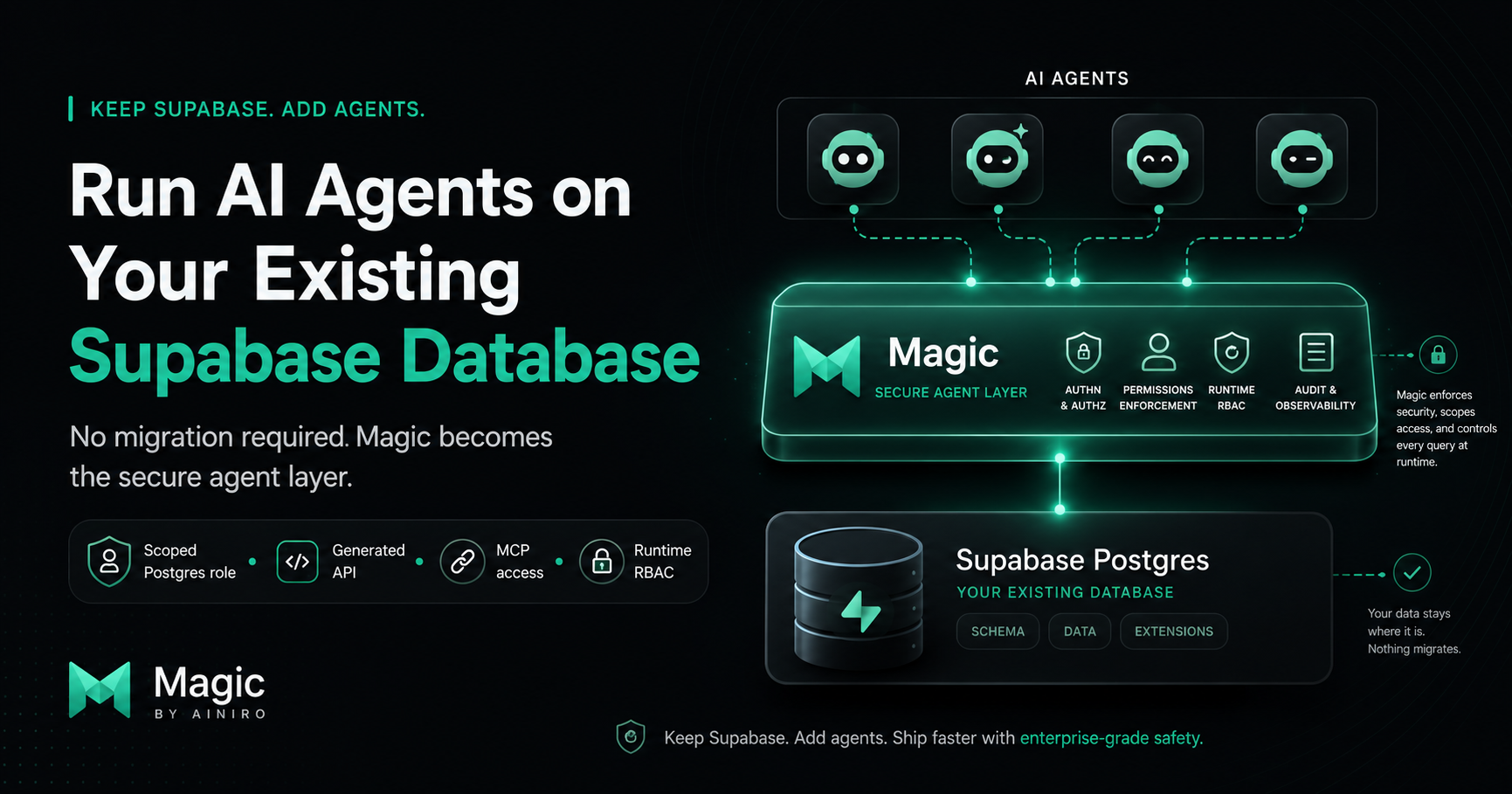
Part of our Supabase series — if you are weighing the platforms against each other, start with the Supabase alternative comparison.
Keep Supabase. Add agents.
That is the entire strategy, and the rest of this article is the how.
If you run your product on Supabase, you have probably already looked at connecting AI agents to your data. And you have probably already found the fine print.
Supabase's own MCP documentation is admirably direct about it: do not connect the MCP server to production. It is designed for development and testing. If you must point it at real data, run it in read-only mode.
That guidance is not timidity. It is honesty.
Their MCP server hands the agent something close to a SQL surface over your database. If the agent gets confused, misled, or prompt-injected, the blast radius is your data. Read-only mode and dev-only projects are the correct advice for that architecture.
But it leaves you stuck.
Because what you actually want is agents that operate — create records, update statuses, send notifications, build new capabilities — against the production data your business runs on.
You do not want to migrate off Supabase to get that.
You do not have to.
The short version
Magic connects to any existing PostgreSQL database — and a Supabase project is, underneath everything, a Postgres database you have full connection access to.
So the setup is this.
Your data stays in Supabase. Your existing app keeps talking to Supabase exactly as it does today. Magic connects to the same Postgres as an additional client, and becomes the agent layer.
Agents never touch the database directly.
They talk to Magic over MCP, and Magic's runtime decides — at execution time — what they are allowed to do.
Nothing migrates. Nothing about your current stack changes.
The setup, step by step
The whole thing takes minutes, not days.
First, get your connection string from the Supabase dashboard. Every project exposes a standard Postgres connection string under its database settings.
Second — and this is the step worth doing properly — create a dedicated Postgres role for Magic, with grants scoped to exactly the tables and operations you want the agent layer to reach. This is standard Postgres hygiene, and it gives you a database-level boundary underneath everything else in this article. If Magic's credentials can only touch three tables, no amount of confusion above them changes that.
Third, add the connection string to Magic as a PostgreSQL database connection.
Fourth, let Magic's CRUD generator read the schema. It emits one endpoint per operation per table — create, read, update, delete — each with authentication and role-based access control already wired in. Your Supabase tables become a secured HTTP API without you writing anything.
Fifth, connect your agent to Magic's MCP server.
At that point Claude, Codex, Qoder, or any MCP-capable agent can operate on your Supabase data — through generated, permission-checked endpoints instead of raw database access.
Why this is safe where direct connection is not
This is the part that deserves a real explanation, because "we put a layer in between" is what everyone says.
The difference is what the layer enforces, and when.
When an agent connects to a database directly, safety is advisory. The system prompt says be careful. The read-only flag removes write capability entirely — which also removes the usefulness. There is nothing structural between a confused agent and a destructive query, which is precisely why Supabase tells you to keep it away from production.
Magic's layer is not advisory.
Every endpoint declares which roles may invoke it, and the runtime checks this at execution time — the agent operates as an authenticated user, and an endpoint outside its roles refuses to execute. Not "is instructed to refuse." Refuses.
Below that sits the whitelisting system. Magic's runtime executes code as an AST where every node must bind to an explicitly allowed capability. Code running in a constrained context cannot bind to capabilities outside its whitelist — the invocation is structurally impossible, not filtered after the fact.
And below that sits the scoped Postgres role from step two, enforced by Postgres itself.
Three layers, each enforced by a runtime rather than a prompt.
The practical consequence: the worst a confused agent produces on this stack is a failed execution. On a direct connection, the worst it produces is an incident. That is the difference between an architecture you demo and an architecture you leave running.
One honest note on row-level security, since Supabase users rightly care about it: RLS applies per Postgres role, and Magic connects as its own role. Your existing RLS policies continue protecting your existing clients exactly as before — nothing about your current app's security changes. The agent surface is governed by the scoped grants you gave Magic's role, plus Magic's endpoint-level RBAC on top. Access control does not get weaker in this setup. It gets layered.
What you actually get
Once Magic sits next to your Supabase database, the agent layer is not just CRUD.
You get a secured HTTP API over your existing tables, generated in seconds and editable afterwards.
You get an MCP server exposing the whole platform, so agents can query data, create records, and manage files and tasks inside enforced boundaries.
You get scheduled tasks — agents (or you) can set up recurring jobs that run against your data and, for instance, send email, which Magic handles natively.
You get the AI layer: RAG-based machine learning types and embeddable chatbots that can be grounded in the data already sitting in your Supabase tables.
And you get the part that has no direct equivalent anywhere else: agents that extend the backend. Through the Hyperlambda Generator, an agent can describe a new endpoint in plain language and have it generated, deployed, and live — inside the same execution-time permission model as everything above.
Your Supabase project keeps doing what it does well. Magic adds the operational surface that agents need and Supabase, by its own documentation, does not want to give them.
The honest fine print
You are running one more system. Magic deploys as a single Docker container (plus one for its dashboard), but it is still a component you host, update, and monitor.
Network locality matters. Put your Magic instance in the same region as your Supabase project, or every generated endpoint pays cross-region latency to reach Postgres.
The generated API is a second write path into your database. That is the entire point — but it means the scoped Postgres role from step two is not optional advice. Do it first, not eventually.
And if what you wanted was agents inside Supabase's own tooling — their dashboard, their client SDKs — this is not that. This is an independent, MIT-licensed layer that happens to speak fluent Postgres.
Conclusion
The reason people hesitate to run AI agents on their Supabase database is not that it is impossible.
It is that the direct path is unsafe, and the vendor says so in writing.
The answer is not to wait, and it is not to migrate.
Keep Supabase as your database. Add Magic as your agent layer. Scope a Postgres role, generate the API, connect the agent over MCP — and let a runtime, not a prompt, decide what the agent can do.
Your data stays exactly where it is.
The agents finally get to work.
Magic is MIT-licensed and open source — the repository is at github.com/polterguy/magic, with documentation at docs.ainiro.io.
Frequently asked questions
Can I run AI agents on my Supabase database without migrating?
Yes. Magic connects to your Supabase project's Postgres as an additional client and becomes the agent layer, while your data and your existing app stay exactly where they are. Nothing migrates and nothing about your current stack changes.
Why is running AI agents on Supabase over MCP unsafe by default?
Supabase's own MCP documentation says not to connect its MCP server to production, because it hands the agent something close to a SQL surface over your database. Magic replaces that with generated, permission-checked endpoints that the runtime enforces at execution time, so the worst a confused agent produces is a failed execution.
How do I connect AI agents to an existing Supabase database with Magic?
Get the Postgres connection string from the Supabase dashboard, create a dedicated Postgres role scoped to the tables the agent may reach, add that connection to Magic, let the CRUD generator emit secured endpoints per table, and connect your agent to Magic's MCP server. The whole setup takes minutes.
Does Magic break my existing Supabase row-level security?
No. RLS applies per Postgres role and Magic connects as its own role, so your existing policies keep protecting your existing clients exactly as before. The agent surface is governed by the scoped grants you gave Magic's role plus Magic's endpoint-level RBAC on top.
Related reading
- Magic as a Supabase Alternative
- Magic Cloud: The self-hosted Supabase alternative built for AI agents
- Why secure AI code execution requires runtime whitelisting, not prompt filtering
- Magic now supports MCP server integration for AI agents
- Connect Your AI Agent to Your Existing Databases Using Natural Language