 Hyperlambda
Part of our database-agents series — the overview lives at Database AI Agents.
Keep the database. Add the agent.
If your data lives in SQL Server or MySQL, you have mostly been left out of the AI agent conversation. The demos run on fresh Postgres in someone's cloud. The tooling assumes a greenfield stack. And the databases that actually run your business — the ERP on SQL Server, the line-of-business MySQL nobody is allowed to touch — get treated as a problem to migrate away from rather than an asset to build on.
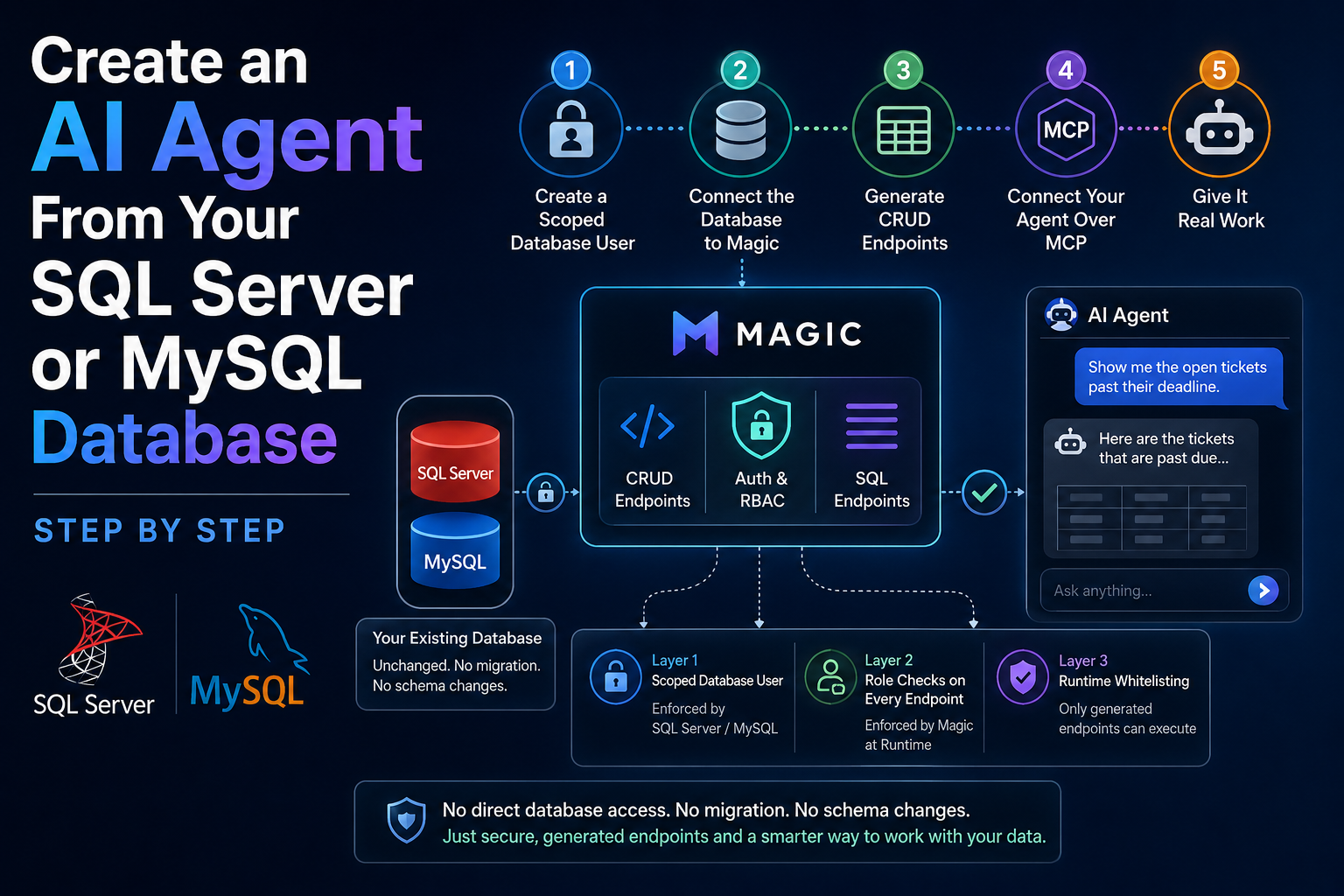
This article is the practical counter to that. By the end of it, you will have a working AI agent that can read and operate on your existing SQL Server or MySQL database — through secured, generated endpoints, with the database itself completely unchanged.
No migration. No schema changes. Nothing installed inside the database. The whole path is: scope a database user, connect Magic, generate endpoints, connect the agent over MCP. Each step takes minutes.
The architecture in one paragraph
Magic connects to your existing database as one more client — the same way any application would. On top of that connection, its CRUD generator reads the schema and generates HTTP endpoints per table, each with authentication and role-based access control wired in. Magic's native MCP server then exposes those endpoints as tools, and any MCP-capable agent — Claude, Codex, Qoder — operates on your data through them. The agent never touches the database directly. Between it and your tables sit three enforced layers: the scoped database user, the runtime's role checks on every endpoint, and the whitelisting system underneath. All of it runs wherever you need it to — including fully on-premise, on the same network segment as the database.
Now the steps.
Step 1. Create a scoped database user for Magic
Do this first, not eventually. It is the layer everything else stands on, and it is enforced by the database engine itself — the one component in this whole stack you already trust completely.
On SQL Server, create a login and a database user for Magic, and grant it exactly the access the agent layer should have. If the agent should only work with three tables, grant SELECT on three tables and nothing else. Add INSERT or UPDATE per table when you are ready for writes.
On MySQL, same idea: create a dedicated user and GRANT it the specific privileges on the specific tables.
One practical caveat before you lock this down completely: the endpoint generation in step three depends on reading the schema — tables, columns, types, and keys, the metadata your database exposes through its information schema views. A user scoped down to SELECT on three tables may not be able to see enough of that metadata for the generator to do its job. The pragmatic answer is a temporary, less restricted user with metadata read access, used only while generating the endpoints — then switch Magic's connection to the tightly scoped user for everything that runs afterwards. Generation is a one-time act you perform deliberately; the scoped user is what the agent lives with.
This is ordinary DBA hygiene, and that is precisely the point. You are not learning a new security model to give an agent access to your data — you are using the one your database has had for decades. If Magic's credentials can only read three tables, nothing generated on top of them can do more than that, no matter how confused any layer above ever gets.
Starting read-only is the conservative default, and I recommend it. A read-only agent over real business data is already genuinely useful — and it turns the scariest question in this whole exercise ("what if the agent writes something wrong?") into a non-question for day one.
Step 2. Connect the database to Magic
Magic deploys as one Docker container for the backend and one for the dashboard. For an on-premise database, run them inside the same network perimeter — the connection never has to cross your firewall.
Add your database as a connection in Magic, using the credentials from step one. Magic speaks to SQL Server and MySQL through the standard .NET data providers, so the connection string is the same shape your existing applications already use.
That is the entire integration. Magic is now a client of your database — nothing more. Your existing applications, integrations, and reports continue exactly as before, because nothing about the database changed.
Step 3. Generate CRUD endpoints for the tables that matter
Point Magic's CRUD generator at the connected database and it reads the schema — tables, columns, types, keys — and generates Hyperlambda HTTP endpoints for the tables you select: read, create, update, delete, and count, each as its own endpoint, each with authentication and role-based access control already in place.
Two decisions are worth actual thought here, and they are both decisions a DBA is well equipped to make.
Which tables become capabilities. Not the whole schema. The agent needs the tables that answer real questions and support real workflows — customers, orders, tickets. Internal bookkeeping tables can stay unexposed.
Which operations each table gets. If you scoped the database user read-only in step one, generate read and count endpoints and the two layers agree with each other. When you later grant writes at the database level, generate the matching endpoints then.
If your database carries queries that do not fit CRUD — the reporting join across six tables, the aggregate someone runs every Monday — wrap them with the SQL endpoint generator: you write the SQL, define its arguments, and it becomes one more secured endpoint. Legacy databases have earned their weird queries; this is how they become tools instead of tribal knowledge.
Then test the endpoints the ordinary way, over HTTP, before any AI enters the picture. List records. Fetch one. If something about the exposure feels wrong — a field that should not be visible, a table that should not be writable — this is where the correction costs nothing.
Step 4. Connect your agent over MCP
Magic includes a native MCP server. Connect Claude — or any MCP-capable agent — to it, authenticating as a Magic user with specific roles.
This step is where the earlier decisions pay off. The agent does not receive a database connection, and it does not receive a SQL surface. It receives tools: the endpoints you generated, filtered by the roles of the user it authenticated as. An endpoint outside its roles does not execute. Not "is instructed not to" — does not.
That distinction is the difference between this architecture and the "just let the model write SQL against production" demos. Prompts are not permissions. A runtime that refuses to execute is a permission. I have written about this at length in the runtime whitelisting article, so here I will just note what it means practically: the worst a confused agent produces on this stack is a failed call, and underneath even that failure sits the scoped database user from step one, enforced by SQL Server or MySQL itself.
Step 5. Give it real work
The agent is now connected to your actual business data, so test it with actual business tasks — not trivia.
Ask it to look up a customer and summarise their order history. Ask which tickets are open past their deadline. Ask it to cross-reference two tables the way a colleague would ask a DBA. If you exposed writes, have it create a record, then verify the row in the database yourself.
Two things tend to happen in this phase. First, the agent is more useful than expected, because it is grounded in real data rather than improvising. Second, you immediately get ideas for the two or three custom SQL endpoints that would make it dramatically better — which is exactly the right feedback loop. Add them, and the agent's toolbox grows without its permissions growing.
What you have at the end
A twenty-year-old database, unchanged, now has: a secured HTTP API over the tables that matter, an AI agent that operates through that API inside role boundaries, and a clean growth path — more tables, more custom endpoints, writes when you are ready — where every expansion is a deliberate grant rather than an accident.
And because every layer of this runs in containers you place yourself, the entire stack — database, API layer, MCP server — can live on-premise, behind the same firewall, in the same network segment the auditors already approved. The agent connects in; the data never leaves.
The pattern generalises past the first agent, too. The same endpoints serve embeddable chatbots, scheduled tasks that run against the data and send email, and — through the Hyperlambda Generator — agents that describe new endpoints in plain language and have them generated inside the same permission model. The first agent is rarely the last thing you build on this surface.
FAQ
Does the AI agent get direct access to my SQL Server or MySQL database?
No, and that is the core of the design. The agent talks to Magic over MCP and only ever invokes generated endpoints, each gated by roles at execution time. The database only ever sees Magic's scoped credentials from step one.
Can I do this without allowing any writes?
Yes — and it is the recommended starting point. A read-only database user plus read-only generated endpoints gives you a useful question-answering agent over live business data with no write path at all.
Does my database need to be reachable from the internet?
No. Run Magic's containers inside the same network as the database. The database port never needs external exposure — the MCP surface is the only thing you choose to make reachable, and it sits behind authentication.
Do I have to write Hyperlambda?
No. The CRUD generator emits it, and the SQL endpoint generator wraps SQL you already know how to write. The generated code is readable and editable when you want to customise, but the path in this article involves authoring none of it by hand.
Related reading
- MCP Server — the overview
- Database AI Agents — the overview
- Supabase for SQL Server and MySQL: Magic Brings the Supabase Experience to Legacy Databases, On-Premise
- From SQL Database to AI Agent in Minutes
- How to Run AI Agents on Your Existing Supabase Database (Without Migrating Anything)
- Magic now supports MCP server integration for AI agents
- Connect Your AI Agent to Your Existing Databases Using Natural Language