 Hyperlambda
Yesterday morning, Magic's RAG pipeline worked the way most RAG pipelines work. By the evening it worked the way I think they all should work, and my estimate is that answer quality on specific, factual questions roughly tripled.
That number deserves its caveat up front: it is an engineering estimate backed by a retrieval test I will show you below, not a benchmark over thousands of labeled questions. The benchmark comes later — every question your chatbot answers is logged, so the data to verify me is accumulating as we speak. But the mechanisms behind the estimate are concrete, measurable, and shipped, and this article walks through every one of them — tutorial style, so you can put them to work on your own cloudlet today.
How RAG actually works in Magic
Before the improvements make sense, you need to see the machine they improved. When a user sends a message to a Magic chatbot, the backend assembles the request in a precise order:
- The system instruction — your model's personality and rules.
- Questionnaire answers — anything the user answered when the conversation started, replayed so the model remembers who it is talking to.
- The context — this is the RAG part. The user's prompt is used to search your training snippets, and whatever matches best is injected as one context message. One per turn, replaced every turn — context never stacks up.
- Session history — earlier questions and answers from this conversation.
- The latest prompt.
The context in step 3 comes from a slot called get-context. It ranks your training snippets by how well they match the question, then packs the best ones into the request — greedily, in order, until Max context tokens is spent. The model never sees more retrieved material than you budgeted.
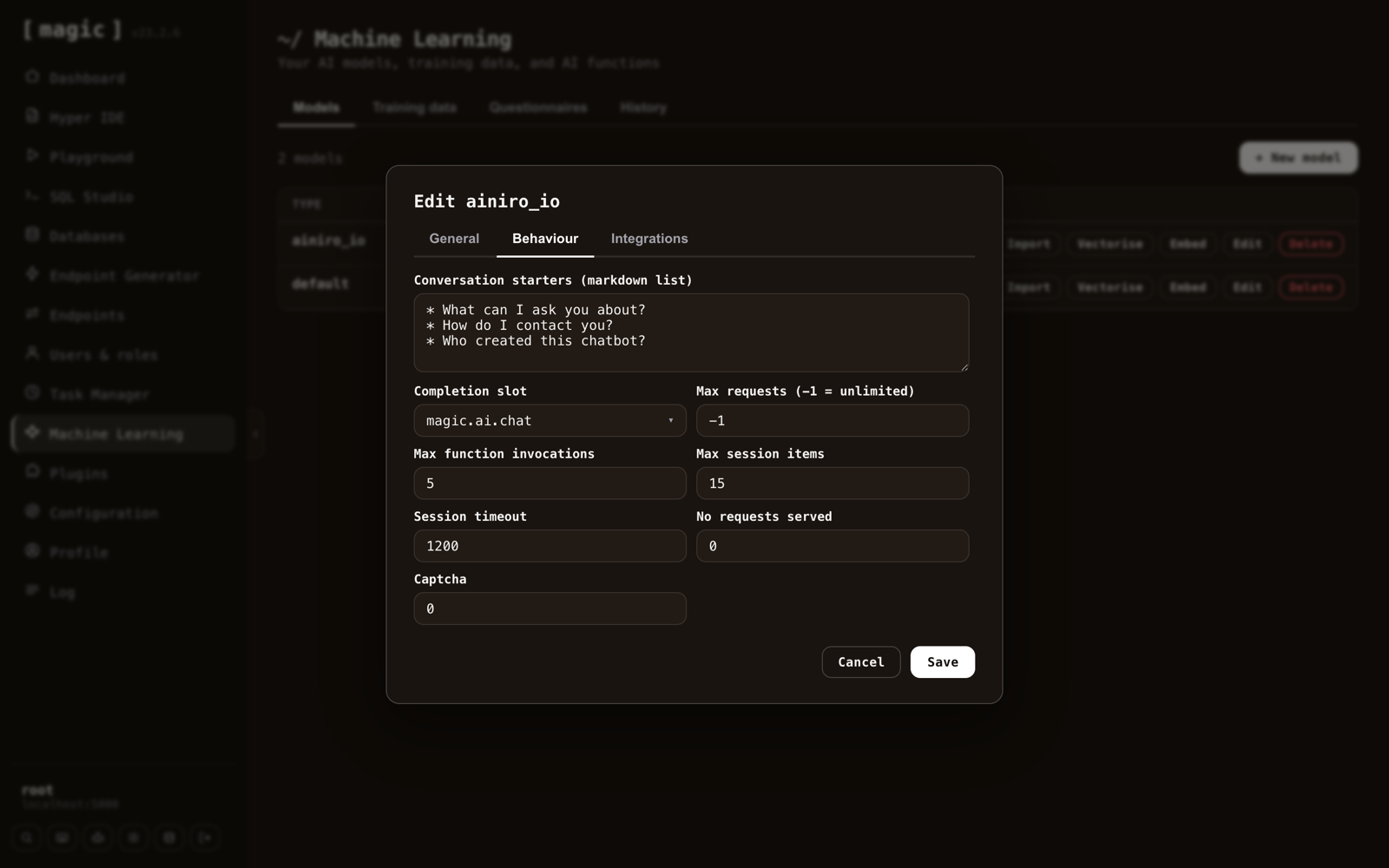
Session history has its own budget: conversations are cached per session, pruned oldest-first once they exceed Max session items (fifteen by default), and expire after Session timeout seconds (twelve hundred by default). The system instruction and questionnaire answers are never pruned — only conversation history rolls. Both knobs live on the model's Behaviour tab:
For long tool-heavy sessions there is a second mechanism on top of this — dream prompt compression — but for this article, the important insight is simpler: answer quality is decided by what the search in step 3 finds. Everything I improved, I improved because of that sentence.
What was quietly wrong
Magic's crawler scraped a page, chopped out lists and code blocks as separate snippets, and imported the rest of the page as one big blob. That design had three problems I had stopped seeing because I saw them every day.
One page, one embedding. A pricing page covers ten subjects, but a blob gets one vector — the average of all ten. Ask a narrow question and the average matches weakly. The right answer was in the corpus, but retrieval could not find it, or found it diluted with nine other subjects.
Navigation everywhere. Menus, footers, and cookie banners were embedded into every snippet of every page. Identical boilerplate pulls every page's vector toward every other page's vector — the corpus discriminates worse between its own pages.
Summaries destroyed facts. Pages too large for the context window were summarized — and summaries are precisely where prices, dates, and phone numbers go to die. Worse still, the converter silently dropped entire categories of text before anything got embedded: FAQ questions written as <details>/<summary> elements, table cells, inline code. Facts your chatbot was asked about daily never made it into the database at all.
Fix #1: Scrape the content, not the page
The crawler now selects what to convert using the page's own markup: if a <main> element exists, that is the content — the author said so. No main, then every <article>. Neither, then the whole <body>, exactly as before. Text is only ever selected, never removed — no hand-written rule of mine ever throws your words away.
The effect is immediate: navigation and footer text simply never enters the corpus, because on any semantically-marked-up site it lives outside main. No embedding dilution, no cleanup, no heuristics.
Fix #2: Split by subject, not by character count
The industry standard for chunking is a character splitter: every N tokens, cut, add overlap, hope. Chunk boundaries land mid-sentence, and no chunk knows what it is about.
Magic now does something different. A page smaller than 80% of your model's Max context tokens imports as one snippet — small pages are already well-scoped. A page larger than that is handed to a cheap, fast LLM with one instruction: work out which distinct subjects this text covers, and rewrite it as one section per subject — reorganization, not summarization. Every number, price, name, and condition survives verbatim; the instruction explicitly forbids shortening.
Each section arrives with its own title, phrased the way a reader would ask about it — and this is the part I would steal if I were you: the title is embedded together with the content. The prompt is half the retrieval signal, so every snippet now carries a question that sits right next to real user questions in embedding space. Here is what a crawl of ainiro.io looks like afterwards:
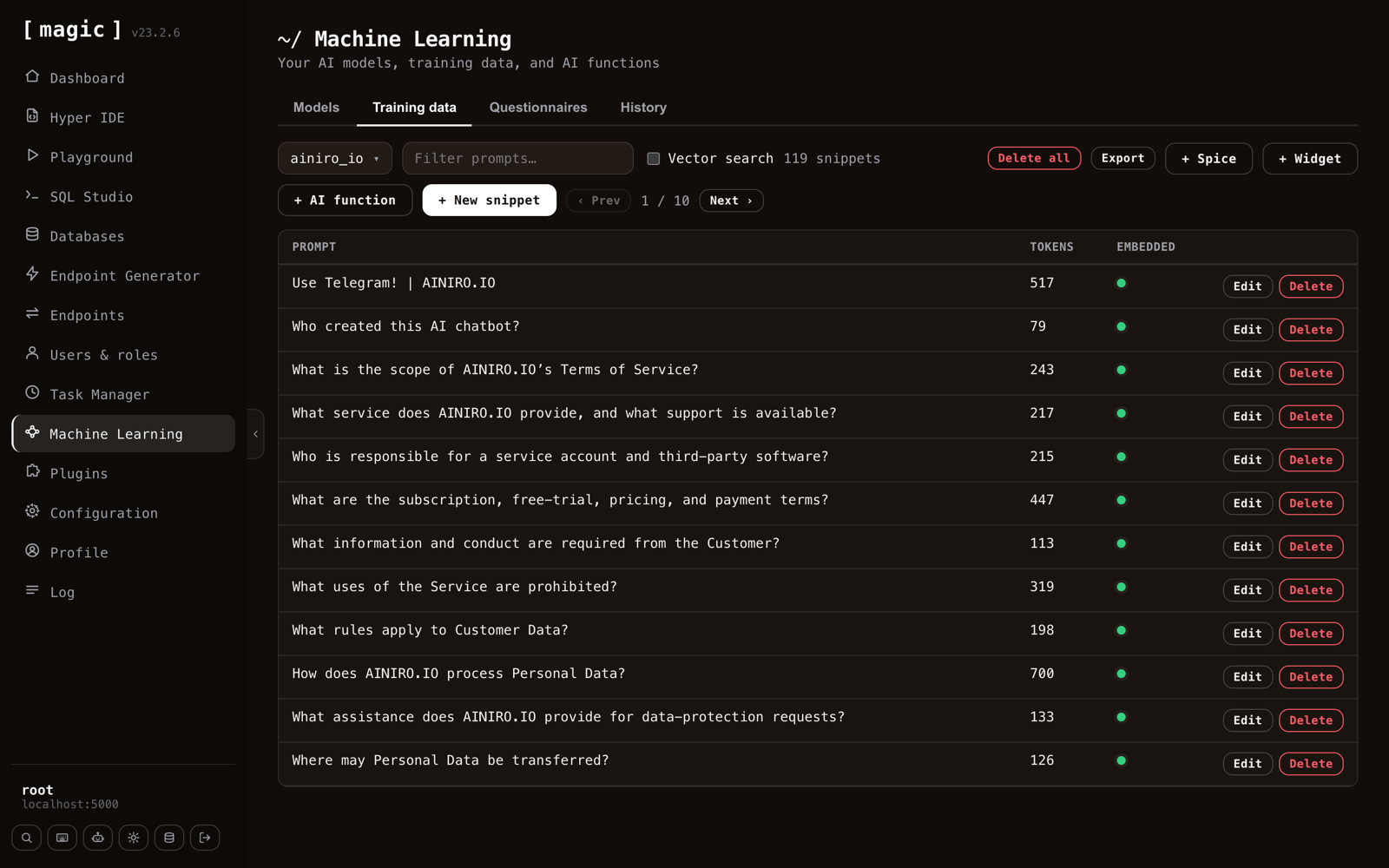
Not a page title in sight — every snippet is a question, and every question is one subject. On gpt-5.6-luna the splitting costs cents for an entire site, which is why nobody did this two years ago and why everybody should do it now.
One page from my test crawl became sixteen snippets, each independently retrievable. And Max context tokens quietly became the most interesting knob in the dialog: it decides both how much context answers get and how fine-grained your corpus is, since it sets the split threshold. I crawled the same five pages at 1,000, 2,000 and 4,000 and got 42, 39 and 5 snippets respectively — 2,000 is the sweet spot, and it is now the default.
Fix #3: A converter that never drops text
The HTML-to-Markdown converter got a new contract: text is never silently dropped. FAQ questions in <details>/<summary> markup now arrive as headings above their answers — ground truth for the exact phrasing users search with. Data tables become real Markdown tables, keeping the row-and-column associations facts live in, with a heuristic that flattens old-school layout tables to prose instead of rendering pipe soup. Inline code keeps its backticks. And scripts, styling, and form machinery are explicitly suppressed — your corpus does not need a country dropdown enumerated in the middle of a snippet.
Fix #4: Keyword search, and RAG without an OpenAI key
Embeddings are superb at paraphrase — "can I take my code and leave" happily matches "keep my applications". They are weak at exact rare tokens: product names, error strings, identifiers. Ask about a term like crudify and cosine similarity gives you vaguely related text, when what you wanted was the one snippet containing that literal word.
That is a solved problem — it is called BM25, it has powered search engines for decades, and it turns out SQLite ships it in the box via FTS5. So Magic's models now have a Retrieval setting:
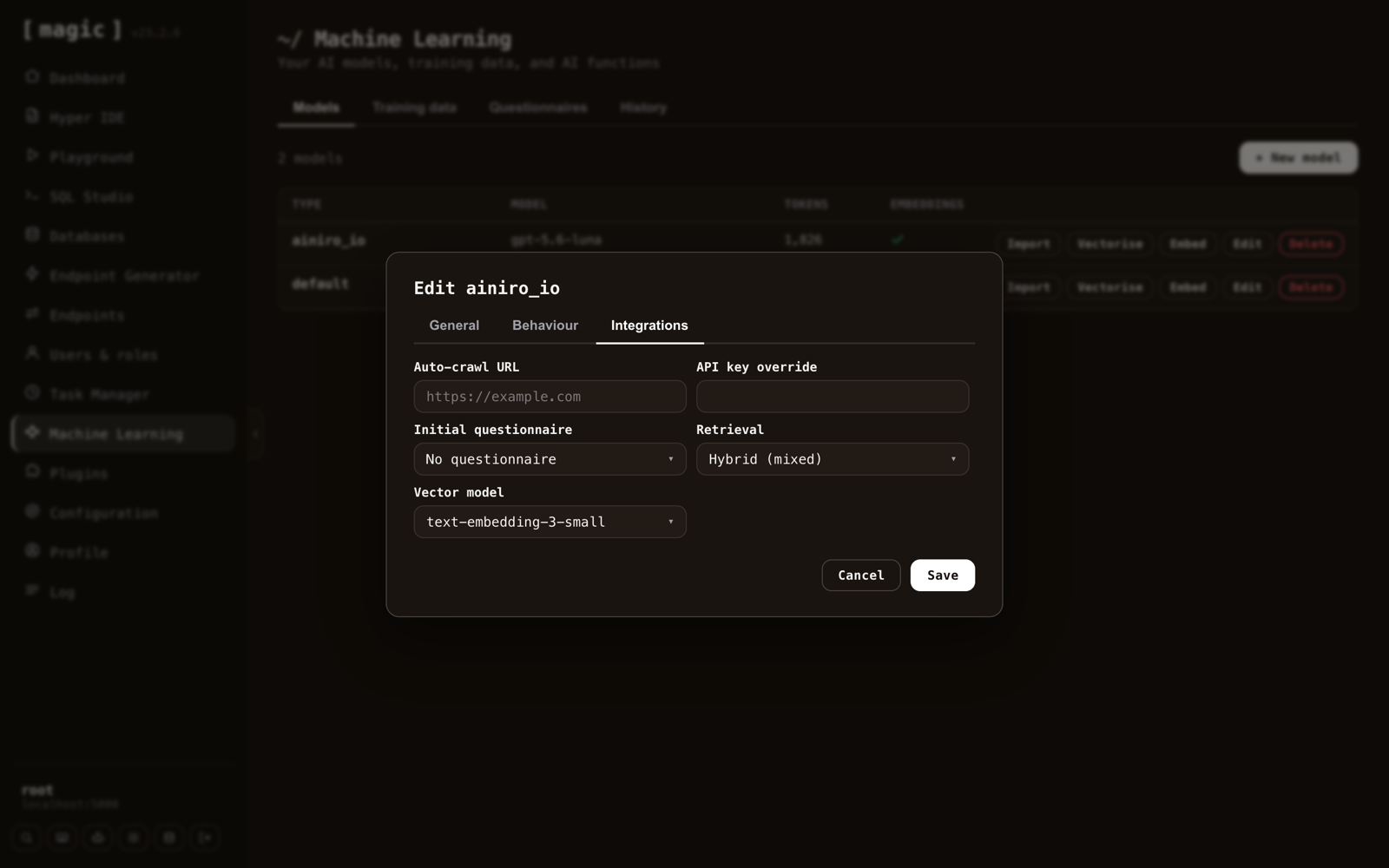
- Semantic (embeddings) — cosine similarity over vectors, exactly as before. The default.
- Keyword (BM25) — pure full-text search. And here is the headline hiding in a dropdown: this mode needs no OpenAI key at all. No embeddings are created, no vectorise step exists — the keyword index is maintained automatically, so snippets are searchable the instant a crawl finishes. Pair it with a self-hosted completion model and the entire retrieval loop runs without a single external API call.
- Hybrid (mixed) — both, merged with reciprocal rank fusion, so each search covers the other's blind spot. The merge happens in a single SQL statement inside the database — no extra infrastructure, no vector database, no search cluster. Your Threshold does double duty here: the semantic leg uses it as its usual distance cutoff, while the keyword leg keeps only candidates scoring at least that fraction of the best hit — BM25 scores are corpus-dependent, so relative to the best match is the only honest cutoff.
Do it yourself
Everything above is in Magic now. Here is the whole workflow, start to finish.
1. Create a model.Machine Learning → New model. The defaults are the ones this article argues for: Max context tokens 2,000, Max tokens 4,000, Retrieval on Semantic.
2. Crawl your site.Import on the model row, paste your URL, and go:
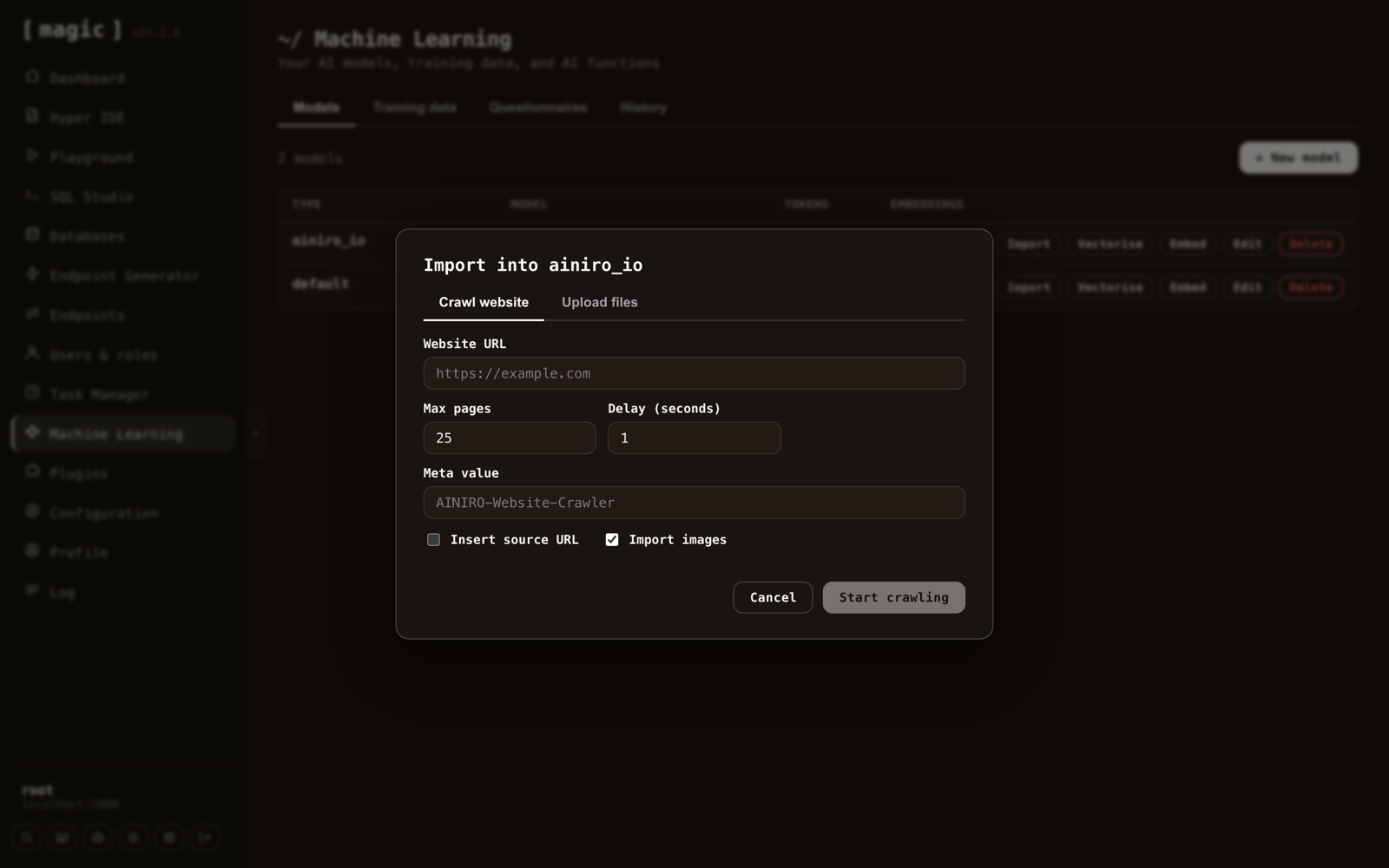
Notice what is not there anymore. No "summarize" checkbox, no text thresholds, no list and code toggles — the pipeline makes those calls now, and it makes them better than the checkboxes did. What remains is what you actually decide: whether images import, and whether each snippet cites its source URL.
3. Inspect what you got. Open Training data and read the prompts. They should look like the screenshot above — questions, not page titles. If your site marks its content with main or article, you will find no menus and no footers anywhere.
4. Vectorise — unless you chose Keyword retrieval, in which case you are already done; there is nothing to vectorise.
5. Test both retrieval styles. Ask a paraphrased question — no shared words with your content — and a rare-token question, some product name or technical term. Semantic wins the first, keyword wins the second, and Hybrid wins both, which is why Hybrid is what I run on my own models now.
6. Embed the chatbot and watch the History tab to see what real users ask — that log is also your benchmark for whether all of this worked.
The knobs, in one table
| Setting | Default | What it does |
|---|---|---|
| Retrieval | Semantic | How snippets are found: embeddings, BM25 keywords, or both fused |
| Threshold | 0.3 | Distance cutoff for semantic search; relative-to-best cutoff for Hybrid's keyword leg |
| Max context tokens | 2,000 | Retrieval budget per answer — and the crawl's split threshold (80% of it) |
| Max request tokens | 1,000 | How large a user question may be |
| Max session items | 15 | Conversation messages kept before the oldest are pruned |
| Session timeout | 1,200 | Seconds of inactivity before a session's memory expires |
| Import images | on | Whether crawled snippets keep their images |
| Insert source URL | off | Appends each snippet's source page as a citation |
The receipts, and the fine print
After re-crawling with the new pipeline, I ran narrow questions against the corpus and checked what retrieval returned as its top hit. Five out of five landed on exactly the right snippet — including "can I take my code and leave?", which shares almost no vocabulary with the page that answers it. The FAQ questions from my pricing page now exist in the database word-for-word as they appear on the site. Scripts, styles, and form noise: zero occurrences across the whole crawl. Retrieval quality is not a chatbot detail — it is the grounding layer everything else sits on, and it is the first thing AI agent builders notice when an agent starts answering confidently from the wrong snippet.
The fine print, because there always is some. The 3x is an estimate until the History data says otherwise — I have been precise about what was measured and what was extrapolated. The first crawl also caught a real bug: one oversized page skipped its split because the LLM call timed out silently, which is now fixed with a proper timeout — but it is a useful reminder that pipelines fail quietly unless you check their output. And none of this improves snippets you crawled before the upgrade: re-crawl, and old blobs are replaced by subject-scoped snippets.
Magic is MIT-licensed and open source — the repository is at github.com/polterguy/magic, with documentation at docs.ainiro.io. If you want to test any of this yourself, a cloudlet is one copy-paste on a $12 DigitalOcean droplet.
Frequently asked questions
How do I improve RAG quality without an OpenAI key?
Set the model's Retrieval setting to Keyword (BM25). That mode creates no embeddings and has no vectorise step; the keyword index is maintained automatically, so snippets are searchable the instant a crawl finishes. Paired with a self-hosted completion model, the whole retrieval loop runs without a single external API call.
What is the best chunking strategy for RAG quality?
Magic splits pages by subject rather than by character count. A page larger than 80 percent of Max context tokens is handed to a cheap LLM that rewrites it as one section per subject without shortening anything, and each section's title is phrased as a question a reader would ask and embedded together with the content.
What is hybrid search in a RAG pipeline?
Hybrid combines semantic embeddings and BM25 keyword search, merged with reciprocal rank fusion in a single SQL statement inside the database, with no vector database or search cluster. Semantic wins paraphrased questions, keyword wins rare-token questions such as product names, and Hybrid wins both.
Do I need to re-crawl my site to get the improved RAG quality?
Yes. None of the improvements change snippets crawled before the upgrade; re-crawl and the old page-sized blobs are replaced by subject-scoped snippets.