Where the machine creates the code

The Hyperlambda Generator: One Sentence In, a Verified Backend Tool Out

Describe a backend tool in plain English. The generator writes it in Hyperlambda, checks every instruction against the functions that actually exist on your cloudlet, and saves it as a live, role-gated endpoint. No build, no restart, no hand-written glue. You meet it in Hyper IDE, in the SQL endpoint tab, and as a tool your MCP agent calls to grow its own tools.

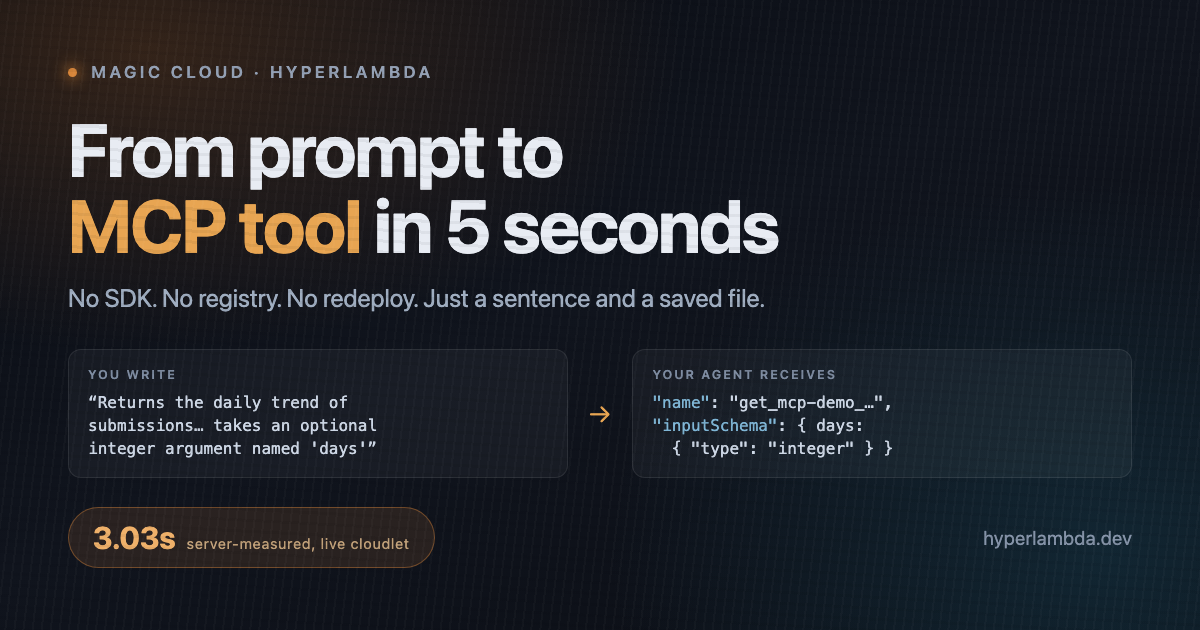
3.03 seconds from sentence to live tool — server-measured, on the cloudlet serving this page
Every instruction verified against the live function registry before the code is returned
Runs inside a whitelisted sandbox with a standing $100 bounty on breaking it — unclaimed
The problem

Free-form code generation is arbitrary code execution with extra steps

Ask a model for Python or JavaScript and you get free-form code. Free-form code can import anything, call anything, and reach anything the process can reach. The model hallucinates an API, a prompt injection in a scraped page rewrites the intent, and the "self-improving agent" is running an attacker's wishlist with your credentials.

So the industry froze the toolbox: humans write every tool, review every tool, deploy every tool. Safe, and frozen solid. The generator exists because the problem was never that machine-written tools are a bad idea. It is that free-form languages make them unsurvivable.

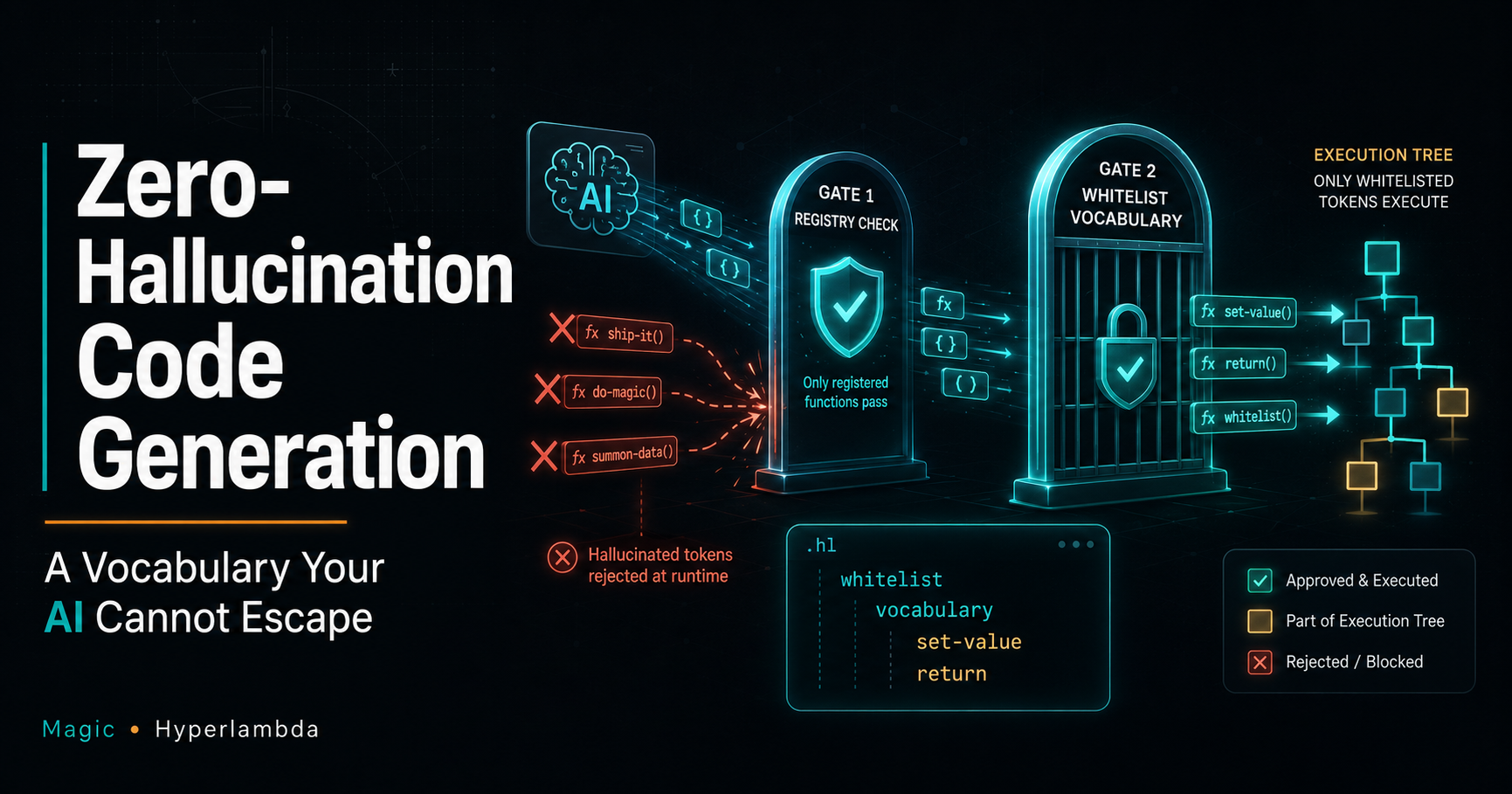
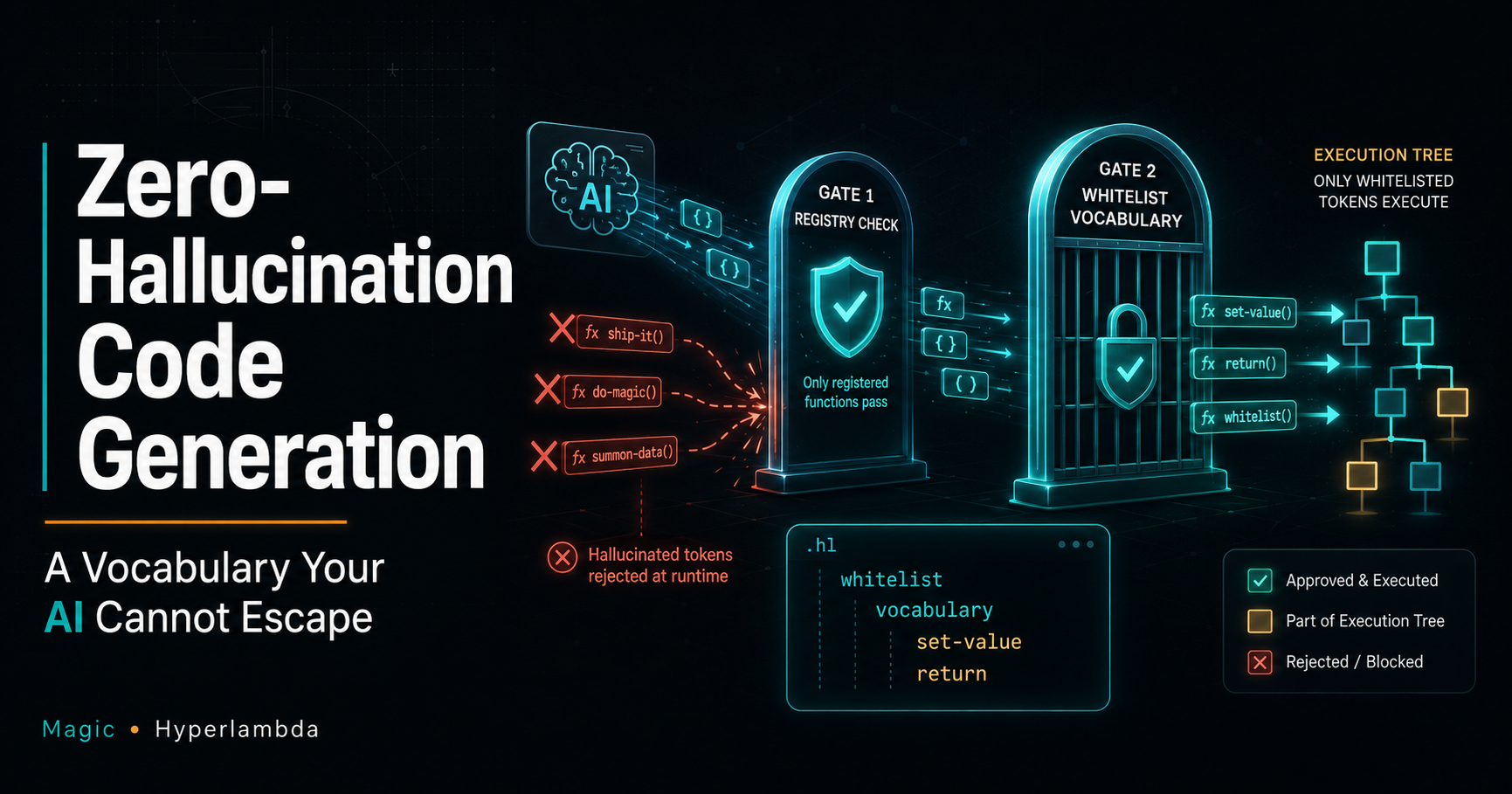
A closed vocabulary the model cannot escape: generated code can only name functions the runtime knows
How it works

Not text to code. Text to a verified execution tree.

Hyperlambda is not text that gets executed. It is an AST: a tree where every executable node is the name of a function the runtime knows. The generator is a model fine-tuned on that language, and the runtime sits between the model and your server with three locks.

Your sentence is the docstring

The prompt becomes the file's leading comment, and that comment becomes the tool description your agent reads when deciding whether to call it. Write it like documentation: what it returns, who wants it, every argument with its type, every table and path by name.

Verified before it is returned

The runtime walks every executable node at every depth and checks it against the registry of functions that exist on your instance. A hallucinated name is a mechanical verdict: false, plus the names, fed straight back into a regeneration. Code leaves the loop only when every instruction is real.

Caged at runtime

Generated code executes inside a whitelist that names which functions it may call, and can pin their arguments: read this file, connect to this database. Every endpoint it saves is gated by roles the runtime checks at invocation. The worst a bad generation can do is fail, inside its envelope.
Worked example

One sentence in, one live agent tool out

This ran on the cloudlet serving this page. The generator reports its own execution time: 3.03 seconds from the sentence to a live, typed, documented tool over a SQLite table. The last panel is a public endpoint you can call right now, and the full measured ledger, failed first attempt included, is in From Prompt to MCP Tool in 5 Seconds.

1. The sentence

Describe the tool the way you would document it

Returns the daily trend of anonymous carbon footprint submissions, one entry per day, so a caller can see how many people submitted and how heavy their average footprint was. Takes days, an integer, defaulting to 7.
2. What the generator saved

A readable file, verified against the runtime, live the moment it lands

Verbatim apart from the abbreviated comment. The argument type became the tool's JSON Schema type; nobody wrote a schema, a build, or a registration.

footprint-trend.get.hl
// Returns the daily trend of anonymous carbon footprint submissions, one entry per day [...]
.arguments
   days:int
validators.default:x:@.arguments
   days:int:7
data.connect:billionair
   data.select:"select date(created) as day, count(*) as submissions, avg(total_kg) as average_total_kg from footprints where created >= date('now', '-' || @days || ' day') and total_kg > 0 group by day order by day desc"
      days:x:@.arguments/*/days
   return-nodes:x:@data.select/*
3. Call it yourself

The same endpoint an agent calls, over plain HTTP

terminal
$ curl "https://hyperlambda.dev/magic/modules/mcp-demo/footprint-trend?days=365"
[{"day":"2026-09-02","submissions":2,"average_total_kg":8150.0},
 {"day":"2026-09-01","submissions":1,"average_total_kg":13400.0}, ...]
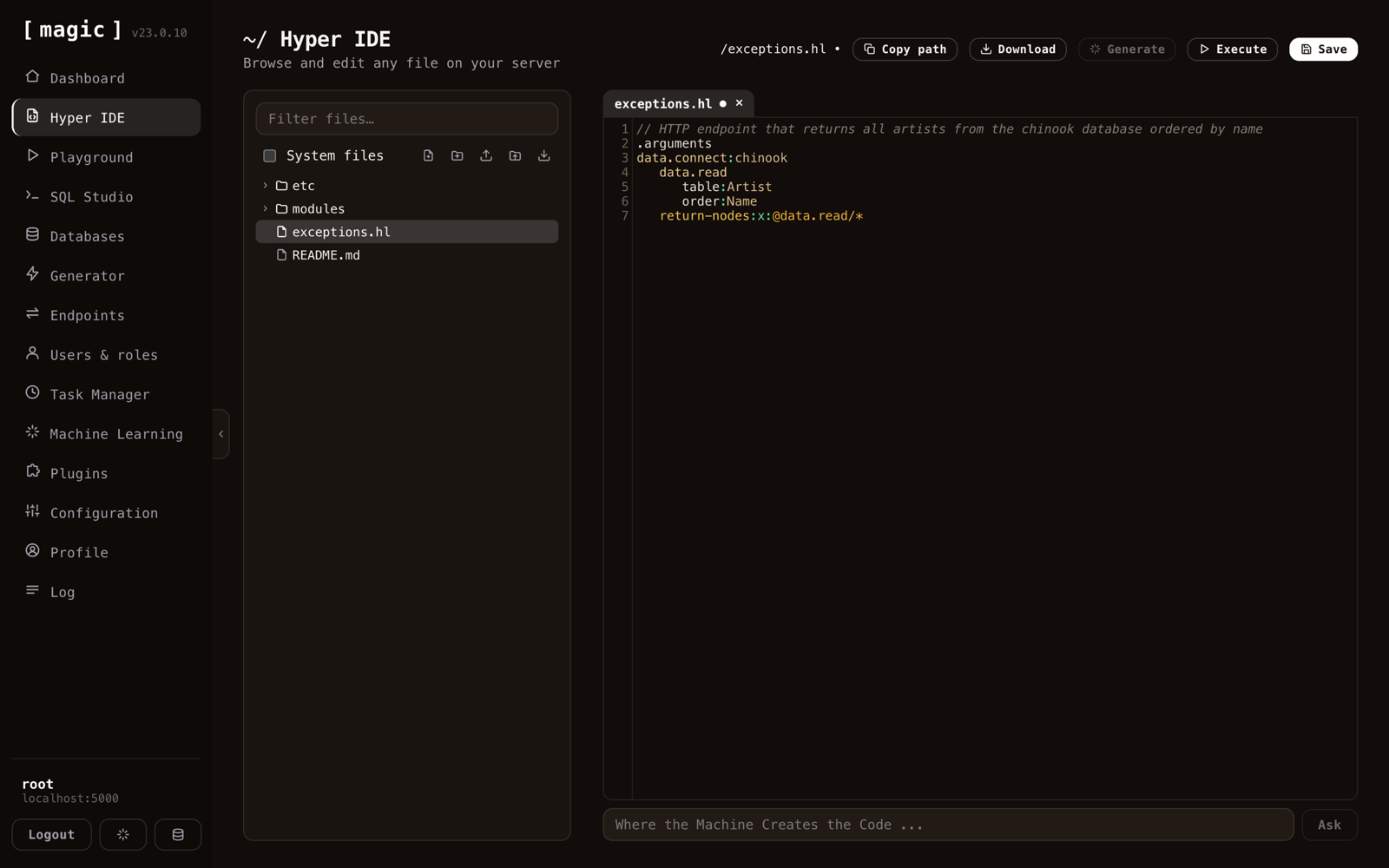
Hyper IDE with a generated Hyperlambda endpoint open in the editor and the 'Where the Machine Creates the Code' prompt bar at the bottom
Where you meet it: Hyper IDE

The Ask bar under every file

Open any file in Hyper IDE and the bar along the bottom reads "Where the Machine Creates the Code". Type what the file should do, click Ask, and the generated Hyperlambda lands in the editor above, verified, with your sentence as its leading comment. Hand it a filename and the file is the endpoint: Hyperlambda is interpreted, so a file appearing on disk is the deployment.

Select a piece of code and press F1 to ask what it does. The same generator, driven by a human instead of a machine.

Where you meet it: the SQL endpoint tab

Text-to-SQL, once, with a reviewer

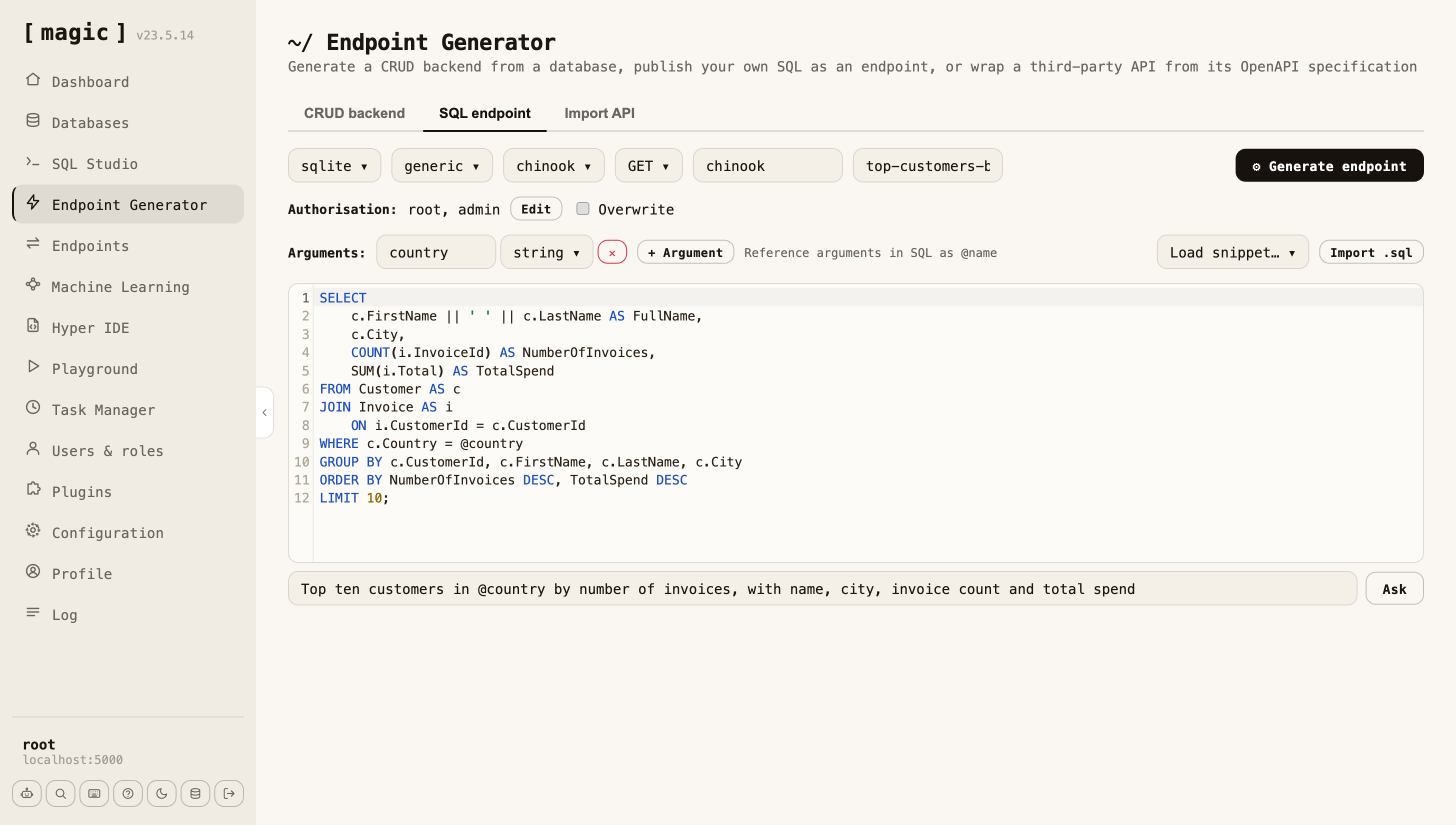
The SQL endpoint tab of the Endpoint Generator has the same bar under its editor, in SQL mode. Describe the query in English, and the machine writes the SQL against your actual schema, argument placeholders included. You read it, run it, declare the arguments and their types, pick a role, and click Generate endpoint.

That is text-to-SQL done once, at design time, with a DBA reading the result in a language they already know, and then frozen as a role-gated tool. The agent that calls it later never writes SQL and never sees a connection string. The full argument is on Database AI Agents.

The SQL endpoint tab with a country argument declared, a plain-English request in the prompt bar, and the SQL the machine wrote from it in the editor
Where you meet it: over MCP

The tool that makes tools

Connect an agent to a cloudlet over MCP and the generator is in its tool list. When the agent hits a capability that does not exist, it describes it in a sentence, hands the sentence to the generator, invokes the result, and carries on with the conversation. The tool persists, so tomorrow's agent is more capable than today's. That is the whole argument of AI Agent Builders, and it only works because the three locks above live in the runtime, not in the prompt. The measured version, a complete role-secured CRM in one conversation, is in the CRM ledger.

Write the prompt like a docstring

The generator sees nothing but your sentence

It cannot see your database, your files, or the conversation you are having. The sentence is the entire specification, and it survives as the documentation your agent reads. The model was trained on hundreds of thousands of Hyperlambda snippets whose comments all read like docstrings, so a prompt that reads like one lands inside the training distribution. A prompt that reads like chat does not.

  1. Lead with what it does and when to use it. That sentence is what a model reads when deciding whether to call the tool.
  2. Name every input, with its type and default. "Takes days, an integer, defaulting to 7." Hyperlambda types become JSON Schema types for free.
  3. Name the database, the tables, the columns, the paths, the URLs. A fact that is not in the sentence does not exist. "Some data from a database" produces garbage.
  4. State the output shape. "A JSON array where each object has day, submissions and average_total_kg." A bare "return the rows" frequently returns nothing.
  5. One task per generation. Fetch, then transform, then send, as separate tools. Multi-step epics degrade output.
  6. Put implementation notes last. They are for the generator, not for the agent that reads the description afterwards.

The honest edge: verified does not mean correct. The verifier proves every instruction exists; it does not prove the code does what you meant. The first generation in the worked example above compiled, verified, saved, and threw a 500 when invoked. The fix was one clause in the prompt and a 1.83-second regeneration. Invoke, read the response, regenerate. Hand-editing is not the workflow, and does not need to be.

The difference

Most stacks generate code. This one generates execution.

A free-form code generator

  • Emits Python or JavaScript that can call anything the process can
  • Hallucinated APIs surface at runtime, in production, as incidents
  • Security lives in the prompt: "please only use tools responsibly"
  • Output needs a human review, a build and a deploy before it runs
  • Every generation is a fresh chance to reimplement the security boundary wrong

The Hyperlambda Generator

  • Emits an AST whose every node must be a function the runtime knows
  • Hallucinated names are caught statically and regenerated before anything returns
  • Security lives in the runtime: whitelist, pinned arguments, roles at invocation
  • Saving the file is the deployment; the tool is live and in the MCP catalogue at once
  • The boundary is implemented once, in the platform, and does not negotiate
From sentence to tool

Five steps, three of them automatic

1. Describe

One sentence, written like a docstring: what, for whom, every input with its type, the output shape.

2. Generate

A model fine-tuned on Hyperlambda writes the file. Around three seconds, server-measured.

3. Verify

Every executable node is checked against the live function registry. Unknown names go back for regeneration.

4. Save

The file lands on disk and is an endpoint, role-gated, already in the MCP tool list.

5. Invoke

Call it, read the response. Wrong result? Change a clause and regenerate. That is the repair path too.

Frequently asked questions
What is the Hyperlambda Generator?

A code generator that turns a plain-English description of a backend tool into Hyperlambda, the executable-AST language Magic Cloud runs. It writes the file, verifies every instruction in it against the live runtime, and saves it as a working endpoint. You reach it from the Ask bar in Hyper IDE, the prompt bar in the SQL endpoint tab, and as an MCP tool that AI agents call to grow their own tools.

Can it hallucinate a function that does not exist?

No. Before generated code is returned, the runtime walks every executable node in it and checks the name against the registry of functions that actually exist on your instance. A name that does not exist is a mechanical verdict, not a runtime surprise: the names go back to the generator, which regenerates, and code leaves the loop only when every instruction is real.

Does verified mean correct?

No, and the distinction matters. Verification proves every instruction exists and every argument is well-formed. It does not prove the code does what you meant. Invoke the endpoint, read the response, and if it is wrong, change one clause in the prompt and regenerate. That is a two-second loop, so it is the workflow, not hand-editing.

How do I write a prompt that gets good code?

Write it like the docstring of the finished file, because that is literally what it becomes: the file's leading comment, and the tool description your agent reads. Name the database and its type, every table and column, every argument with its type and default, the exact output shape with field names, the role required, and every literal such as paths, URLs and thresholds. A fact that is not in the sentence does not exist. One task per generation.

Is it safe to let an AI agent use it in production?

That is what it was built for. Generated code is Hyperlambda, an AST where every node must bind to a whitelisted capability; the whitelist can pin arguments, so code told to read one file cannot read another. Every endpoint it saves is gated by role-based access control the runtime enforces at invocation. A prompt injection that steers the generation still produces code that can only do what the envelope allows. There is a standing $100 bounty on breaking that sandbox, and nobody has.

Do I have to read Hyperlambda to use it?

No. The generated file is readable and editable if you want to, but the intended loop is prompt, generate, invoke, and regenerate from a better prompt. In the SQL endpoint tab the generator writes plain SQL against your schema, which is the language most reviewers already know.

Try it

Describe a tool you wish you had

The whole platform, generator included, on your own hardware, MIT-licensed. Open Hyper IDE, type a sentence into the bar at the bottom, and read what comes back.

terminal
# When it’s up: log in at http://localhost:5555 with root/root, open Hyper IDE, and find the bar at the bottom.
$ curl -fsSL https://hyperlambda.dev/docker-compose.yaml | docker compose -f - up