WYSIWYG web designer · No credits per click · Any HTML, any origin

Point at it. Change it. It’s the file.

Web Designer opens any page your cloudlet serves and lets you edit it the way you edit a document — click an element to select it, double-click a run of text to rewrite it, drag a block in from the palette, drag it somewhere else to move it. There is no model in the loop, no credits per click and no framework requirement, because the canvas runs your page with scripts disabled: what the browser parsed is exactly what gets saved. This page is the honest comparison with Lovable, Bolt, v0, Base44 and Replit — including the rows they win, and they win real ones.

Deterministic — an edit is a DOM change and a CSS rule, not a prompt. Nothing to meter, nothing to wait for
Framework-free — it edits HTML written by anything, including pages that existed long before the tool did
Real CSS in your own stylesheet, fenced — your hand-written rules come back to disk untouched
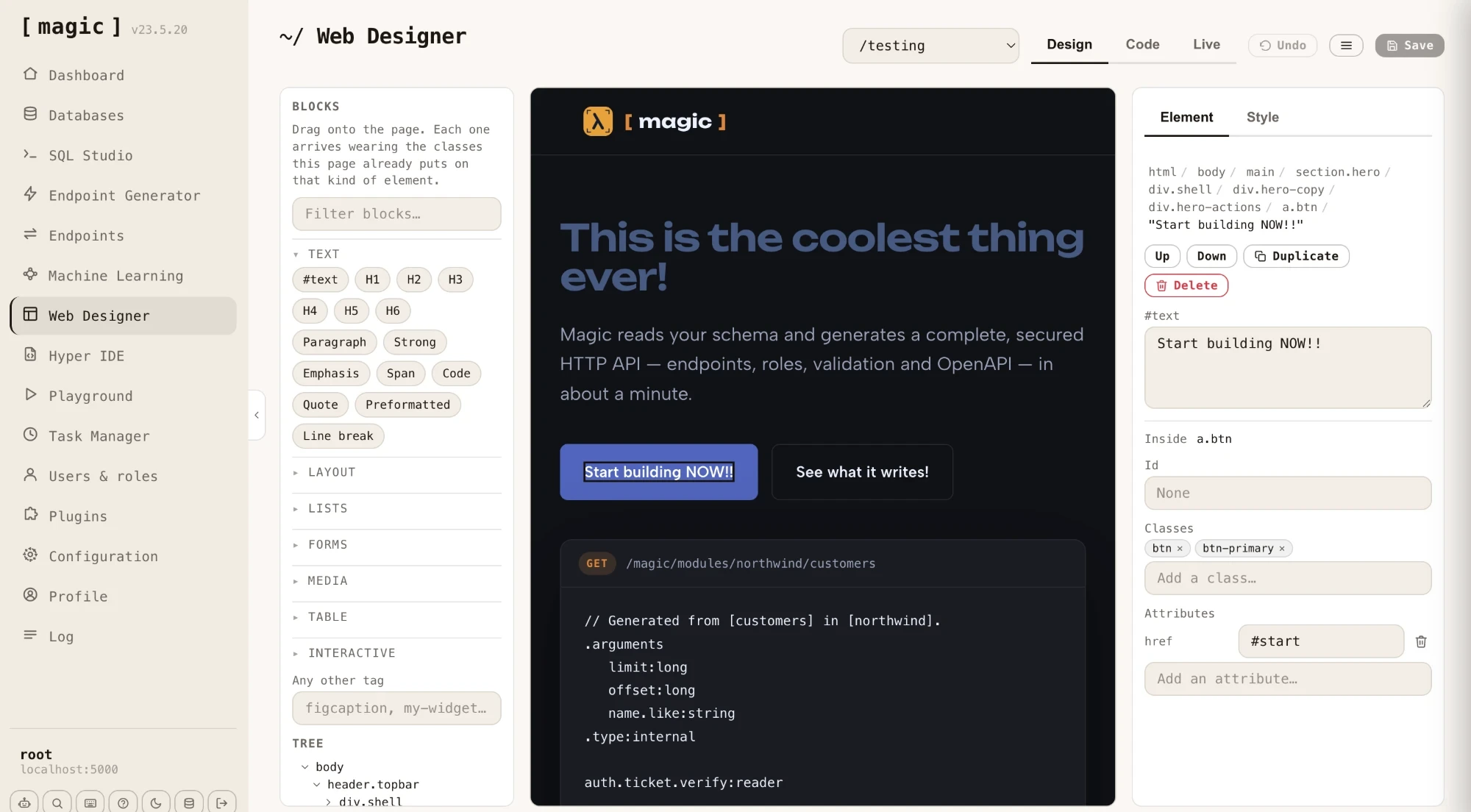
Web Designer editing a page: the block palette and DOM tree on the left, the live page in the middle, and the selected element’s attributes on the right
The architecture, in one sentence

The document is the file, so there is nothing to map

Every other visual editor in this category has the same hard problem: the thing you clicked is a rendered React node, and the thing that must change is a line of JSX somewhere else. Solving it takes real machinery. Lovable stamps stable identifiers into every JSX node with a compiler plugin, parses the whole project into an abstract syntax tree in your browser, and keeps a dedicated development server running per project to make the round trip work.

Web Designer gets the same capability by removing something instead of adding it. The canvas is your page with scripts switched off, so the document cannot drift from the file it came from. The element you clicked is the element that gets saved. No identifiers, no syntax tree, no compiler plugin, and not one extra process per project.

What you actually get

Six things it does that are worth knowing

Selection

Text is a first-class citizen

A run of words inside a paragraph is its own node in the tree, not a property of the tag around it. So a heading that mixes text with an icon and a link is three separate things you can select, rewrite, move and delete. Replit’s editor states the opposite plainly: elements made of several sub-elements cannot be text-edited and go to the agent instead.

The palette

Blocks arrive already dressed

Over sixty blocks, and none of them land unstyled. Each one reads the page it is being dropped into and wears the classes that page already puts on that kind of element — judged first by what sits around the drop point. Drop a button into the navbar and it arrives as a nav item; drop the same button into the header and it arrives as the primary action.

Direct manipulation

Drag to move, with a real drop indicator

Pick anything up and put it somewhere else, with a line showing where it will land and elements that cannot take children never offered as a destination. Bolt’s own announcement says its visual editor does not do layout rearrangement or dragging at all; Lovable asks you to sketch an annotation over the page and have the model interpret it.

The Style panel

Real CSS, fenced, in your stylesheet

Changes become ordinary CSS rules in the page’s own stylesheet, inside a block marked at both ends. Everything above and below those markers is written back exactly as it arrived, so hand-written rules, comments and media queries survive every save. No utility classes sprayed onto your markup, and no Tailwind required anywhere.

Natural language

Or just say what you want

Click an element, then describe the change in plain words — “change it to Comic Sans and orange” — and the machine makes it. Useful when you know the look you are after but not which control produces it, or when the change touches half a dozen properties at once. Pointing stays deterministic and free; this is there for when describing is simply faster than hunting.

Code view

The same file, in an editor

Switch to code and you get the page in a full editor, with a dropdown for every stylesheet it links from this cloudlet, syntax highlighting that follows the file, and the prompt bar where the Machine Creates the Code underneath. Type there and it writes through exactly as typed — your formatting is never rearranged behind you.

Live view

Then run it for real

Design with scripts off, then switch to Live and the page loads from its actual URL with everything running, inside the dashboard. Save is publish: there is no deploy step, no build, and no publish button, because the file you just edited is the file the web server is already serving.

Watch it work

Described, then designed — in one sitting

First Chat Ops is asked for a landing page — for a rooster campaigning for his right to crow at five in the morning — and writes it onto the cloudlet, live, with no deploy step. Then that same page is opened in Web Designer and edited by hand: point at an element, change it, save. Two halves of the same job, and neither one is a mock-up.

The part nobody puts on the invoice

An edit here costs a function call

To make clicking an element change source code, the others keep a development server alive for every project. Lovable has described running thousands of cloud instances to do it. That machine is warm while you think, while you are at lunch, and while you are not there at all, and every save recompiles, re-bundles and hot-reloads a project to show you a different shade of blue.

Here the canvas is an iframe in a browser tab you already had open. The document is the file, so an edit is a DOM call and a rule written into a stylesheet. Nothing is compiled, nothing is bundled, nothing is redeployed, and no container is kept warm on your behalf — the cloudlet is the same process that was already serving the page, and it does no extra work because you dragged a heading two inches to the left.

And that is all before anyone says the word inference. On Bolt, a saved batch of visual edits goes to the model. On v0, the edits are serialised into the chat and a new version of the project is generated. A GPU somewhere spins up because someone changed a font size. Pointing at a thing and moving it does not require a language model, and not requiring one is the whole of the energy argument — the AI is still there when you want it, in the prompt bar, as a choice rather than as the transport layer for a drag.

Put an order of magnitude on it and the honest answer is a fraction of a percent — the idle dev server alone runs continuously where this runs never, and the inference on top has no counterpart at all. That is a structural estimate rather than a measured one: nobody has put two wattmeters side by side, and the number depends entirely on how long a project sits open. The mechanism is the claim, and the mechanism is simply that there is nothing running.

What you can build with it

Not single-page apps. Quite a lot else.

The boundary first, because it is the honest part: the canvas edits a document, so an application whose screens only exist after JavaScript has run is not what this tool is for. That rules out one architecture. It does not rule out applications.

The model it does suit is the one the web used before single-page apps took the default, and which never actually stopped working: the page is a file you design, the server fills in the parts that change, and JavaScript enhances rather than constructs. A table’s shell, its column headers and its empty state live in the file and are laid out here; a fetch call fills its rows from a generated endpoint at runtime. The designer handles the part a human needs to see, and never has to know anything about the rows.

Server rendering works the same way: a template HTML file with named placeholders, filled per request by a Hyperlambda file sitting beside it. The blog on this site is built exactly like that — and because the template is a plain HTML file, it opens in Web Designer like any other page. You design the shell; the server fills it.

Put that next to a schema and the loop closes quickly. Point the CRUD generator at a table and you have secured endpoints in milliseconds; drop a form or a table shell onto a page here; wire one fetch call. That is a working internal application, and every part of it is a file you own.

Micro data-gathering apps — one page, one generated endpoint, one table. Built between two meetings and still running in three years
Line-of-business screens — the approval queue, the stock adjustment form, the thing that has lived in a spreadsheet since 2014
Back-office admin — real screens over a database you already have, generated per table and then laid out by hand
Customer-facing forms — intake, bookings, surveys, support requests, posting to a role-gated endpoint on the same origin
A front end for a system with no front end — the readable half of a twenty-year-old application, without touching the old one
Everything a site is made of — landing pages, documentation, pricing, the pages in front of the product

There is a second-order benefit that matters more than it sounds. Once one of these exists, the person who owns the process can change the wording themselves. The label that confuses everyone, the instruction nobody reads, the field order that was wrong from the start — those stop being tickets. They are a click and a save, by the person who noticed, and the code underneath is untouched.

Older readers will recognise this shape. It is roughly what Dreamweaver felt like, and the reason that felt fast: a page was a file, you designed it directly, and the server filled in the parts that varied. What was missing then was the other half — someone still had to hand-write the backend behind every form. That half is now a sentence and three seconds, which is what makes the old model worth having back rather than merely worth remembering.

It is not the only way in

Four ways to change the same file

A page in your web root is a file, and a file has no opinion about who edits it. That is the quiet advantage of not inventing a project format: everything you already use keeps working, and the WYSIWYG canvas is simply one more hand on the same document.

Point at it. Select, drag, restyle, rewrite. Deterministic, instant, free, and the right tool for a small precise change you can see.

Describe it in the prompt bar. Select an element and say what you want changed, in the same bar that writes code everywhere else in the dashboard. Good for a change that touches several properties at once.

Ask Chat Ops. The dashboard's own agent edits files, generates endpoints and restructures pages on request. When a turn finishes, the designer reloads the page you have open, so its work lands on the canvas in front of you.

Or drive it from the agent you already use. Claude, Claude Code, Cursor, Codex, OpenCode — anything that speaks MCP connects to your cloudlet and edits the same files, role-gated, at plain token cost. Nothing about the designer competes with that: whatever workflow you had before this page existed still works, and now there is a canvas over the top of it.

All four write to one file on one server. Mix them in a single sitting — ask an agent for the section, drag it into place by hand, then let the generator write the endpoint it calls.

The comparison

Magic Cloud vs the AI app builders, honestly

Sixteen rows against Lovable, Bolt, v0, Base44 and Replit. Ten to Magic, six to them — and the six they take are the ones to read hardest, starting with components and data binding. Their behaviour was verified from their own documentation and engineering posts in September 2026; re-check before quoting, because all of these ship weekly.

FeatureLovable, Bolt, v0, Base44, ReplitMagic Cloud
What the canvas isA running React application on a development server kept alive per project — Lovable runs thousands of cloud instances to make this workMagic wins — your page, scripts disabled, served by the same cloudlet that holds it. No extra process anywhere
How an edit reaches the codeLovable mutates a syntax tree in the browser; Bolt and v0 send the change to the model and regenerate the code from itMagic wins — a DOM mutation and a CSS rule, applied directly. What you previewed is what lands
Cost per editBolt spends tokens on every saved batch; Lovable meters text edits past a monthly quota; Replit charges when an edit hands off to its agentMagic wins — nothing. It is not an AI feature, so there is nothing to meter
Energy per editA development server kept warm per project, recompiling and hot-reloading on every save; Bolt and v0 additionally spend model inference on each batch of visual editsMagic wins — a DOM call in a tab you already had open. Nothing is kept warm on your behalf, and no GPU runs because you dragged a heading
Framework requiredReact, with Tailwind, in their project layout. v0’s own documentation says coverage depends on the project being TailwindMagic wins — none. Any HTML file, whatever wrote it
Editing a page they did not createNot supported — the project has to have been built inside their runtimeMagic wins — open anything below your web root, including a page hand-written years ago
Text granularityReplit cannot text-edit an element made of several sub-elements; it routes those to the agentMagic wins — every run of text is its own node, so mixed inline content is editable piece by piece
Moving elementsBolt does not rearrange layout at all; Lovable needs an annotation sketch interpreted by the model. v0 matches us here, with drag handles and reorderingMagic wins — drag anything to anywhere that can hold it, with a live drop indicator
Where the styling goesUtility classes written onto the elementMagic wins — real CSS rules in your own stylesheet, fenced, with everything outside the fence preserved verbatim
Components and data bindingThey win, decisively — they edit React components, so a list rendered from data is one thing you change onceEdits the rendered document. Anything JavaScript builds at runtime is not on the canvas at all
Design tokens and themingBase44 wins — an app-level theme panel recolours and re-fonts everything at oncePer-selector CSS. Changing a brand colour everywhere is a stylesheet edit
Responsive breakpointsThey win — styling per breakpoint from the same panelA width preview for checking layouts; media queries are written by hand, outside the fence
Reuse across pagesThey win — one component, every instance. Replit propagates an edit to all of themNo partials. A navbar across twelve pages is twelve edits, or one prompt to an agent
Assets and mediaThey win — upload an image or swap its URL from the panelThe image block takes a path; the file gets onto the cloudlet another way
History of changesv0 wins — every visual edit becomes a diffable, reviewable, revertable versionUndo while the page is open; Git in the dashboard for everything that matters after that
Where your work livesInside their platform, for as long as the subscription runsMagic wins — a file in your cloudlet’s web root, on hardware you choose, under an MIT licence
The honest section

When you should use theirs instead

You are building a React application and you don’t need to own your own database or API. This is the one that decides it. They are app builders with a visual layer; this is a visual editor for documents. If your screens are components fed by data, a tool that edits rendered output is the wrong shape entirely, and no amount of the rows above changes that.

Your design is a system, not a page. Tokens that recolour an entire app, styling per breakpoint, and one component reused across twenty screens are all things they do and we do not. Ours is CSS in a file, which is simpler and less powerful in exactly the ways you would expect.

You want the agent and the editor to be the same product. Their visual layer sits inside the tool that built the app, so a click and a prompt feed the same thing. On a cloudlet the designer is deterministic and the AI arrives separately — through the prompt bar, or through whichever agent you already use. That separation is the point here, but it is a preference, not a fact.

Where it sits

One system: the API, the database, and the page in front of them

The frontend Web Designer edits is served by the same cloudlet that holds the database it queries and the endpoints it calls, at the same domain. There is no hosting product beside the backend, no CORS configuration between them, and no second deploy. Saving the file is publishing it.

Which means the whole application can come out of one conversation and then be finished by hand: ask an agent for the schema, the endpoints and the page, then open the page here and nudge the words, the spacing and the colours until they are right. Broad structural changes are faster to ask for; small precise ones are faster to point at.

And when the frontend is a real framework application instead, nothing changes underneath it — a compiled React, Angular or Vue build is deployed into the same web root and served the same way, as it always was.

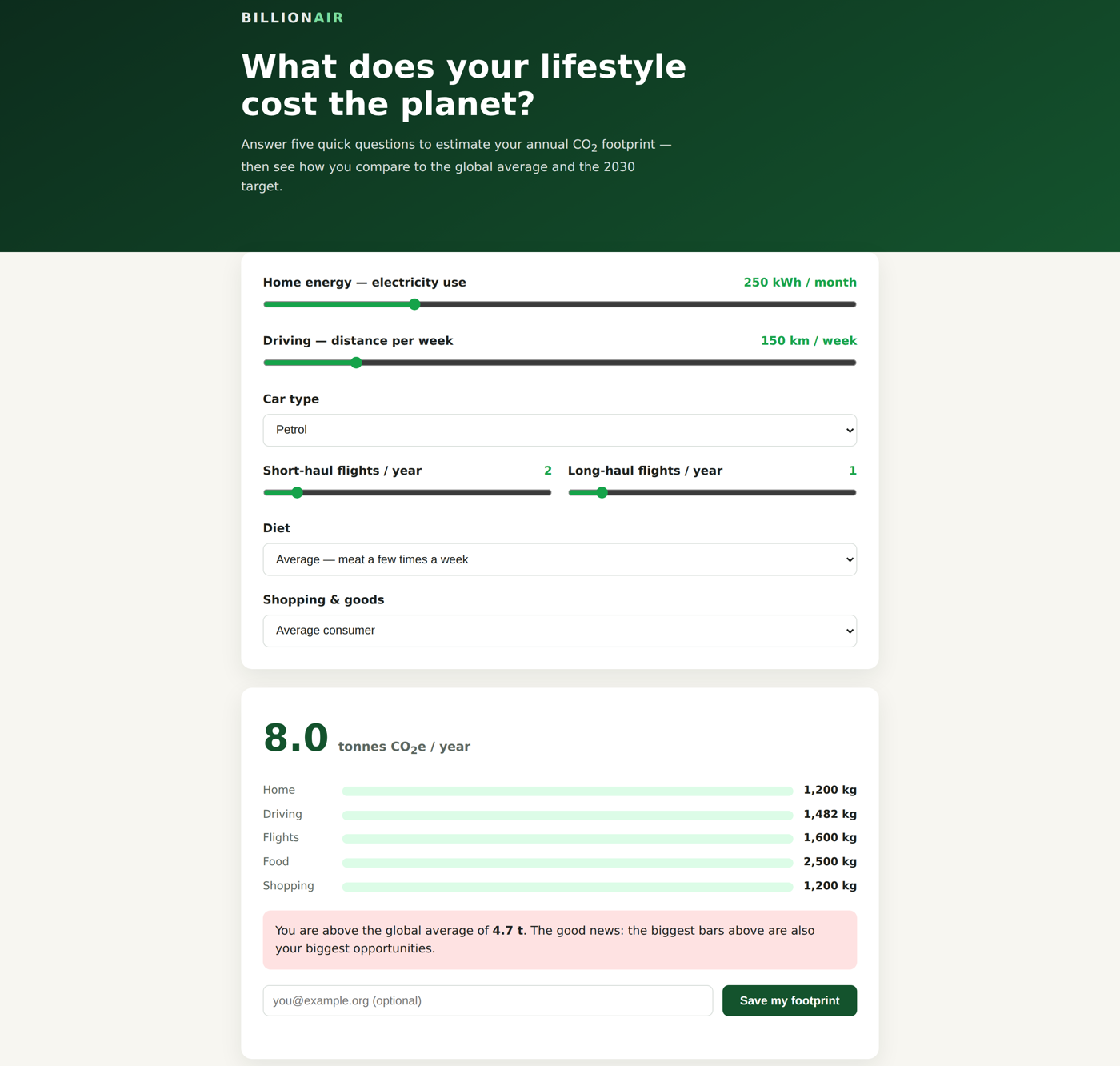
A complete carbon-footprint calculator application built on a Magic cloudlet, showing the branded form and computed results
Frequently asked questions

Questions people ask first

Does Magic Cloud have a WYSIWYG designer?

Yes. Web Designer ships in the dashboard. It opens any HTML page below your cloudlet’s web root and lets you select elements and runs of text, drag blocks in from a palette, move things, edit attributes and write real CSS — then saves the result back to the same file.

Does it work on pages I already have?

Yes, whatever wrote them. Because the editor has no framework to be right about, a hand-written page from years ago, a wizard-scaffolded page and AI-generated output all open the same way. The AI app builders can only edit projects created inside their own runtime.

Will it rewrite my hand-written CSS?

No. Style changes go into a fenced block at the end of the stylesheet, between an opening and a closing marker comment. Everything above and below those markers is returned to disk as the text it arrived as — comments and media queries included. The opening marker carries a warning saying not to hand-edit inside the fence, because that region is rewritten on every save.

Do visual edits cost credits or tokens?

No. An edit is a DOM mutation plus a CSS rule, applied directly, so there is nothing to meter. For contrast: Bolt sends each saved batch of visual edits to the model and spends tokens doing it, v0 serialises your edits into the chat and generates a new version, and Replit charges when an edit is complex enough to hand off to its agent.

Can Web Designer edit a React application?

No, and this is the clearest thing the AI app builders do better. They edit React components, so a list rendered from data is one component you change once. Web Designer edits the rendered document, so anything JavaScript builds at runtime is not on the canvas. A compiled React, Angular or Vue bundle is still deployed to and served from the cloudlet exactly as before — it is simply not what this tool edits.

Why are scripts disabled in the design canvas?

So the document cannot drift from the file. With nothing running, what the browser parsed is exactly what gets saved, which is what removes the need for source maps, compiler plugins and a development server per project. The Live view runs the page for real, scripts and all, whenever you want to watch it behave.

Can I still edit the HTML by hand?

Yes. The Code view puts the same file in a full editor, with a dropdown for switching between the page and any stylesheet it links from this cloudlet, and an AI prompt bar underneath for writing code from a description. What you type is written through as typed, so your own formatting is never rearranged. The same files are also open in Hyper IDE and in git.

Can I build an actual application with it, or only static pages?

Applications, as long as the screens exist in the file rather than being constructed by JavaScript at load time. Design the shell — the form, the table’s headers, the empty state — and let a fetch call fill the rows from a generated endpoint, or let a Hyperlambda file render the page server-side from a template you designed here. Micro data-gathering tools, line-of-business screens, back-office admin over an existing database and customer-facing forms all fit this comfortably. What does not fit is a single-page app whose markup only exists after the framework boots.

How is this different from Elementor or the WordPress block editor?

Elementor and the block editor are good page builders, and what they edit is content in a database, assembled at request time by a theme and a stack of plugins. Web Designer edits a static HTML file that the server sends exactly as it is — no database row, no shortcode, no theme, no plugin to keep patched, and no render step between what you changed and what a visitor downloads. That is simpler and considerably faster; it also means none of WordPress’s ecosystem of templates and widgets exists here. If your site is WordPress, keep Elementor. This is for the pages a cloudlet serves alongside its own APIs.

Is it like Webflow or Wix?

Same intention, different economics, and a much smaller box. Webflow and Wix give you breakpoints, a CMS, template libraries and hosting on their infrastructure — and your site lives inside their system. This is a canvas over a file on hardware you choose, MIT-licensed, sitting next to the database and the API that page talks to. For a marketing site built by someone non-technical, theirs are the better tools and we say so on the Wix comparison. For a page in front of an application you own, this edits the actual artefact rather than a record describing it.

Try it on your own page

Five minutes to a cloudlet, then point at something

The whole platform — database, generated APIs, auth, the MCP server, frontend hosting, and now a designer that edits the served file itself — on your own hardware, MIT-licensed. Still evaluating? The Lovable, Base44 and Retool comparisons are written the same honest way as this page. The rest of the case lives on AI Agent Builders, the Hyperlambda Generator and the Natural Language API, and the long-form arguments are in the open source AI app builders roundup, There Is a Discord Called Base44 Refugees and the Wix arithmetic.

terminal
# When it’s up: log in at http://localhost:5555 with root/root.
$ curl -fsSL https://hyperlambda.dev/docker-compose.yaml | docker compose -f - up