 Hyperlambda
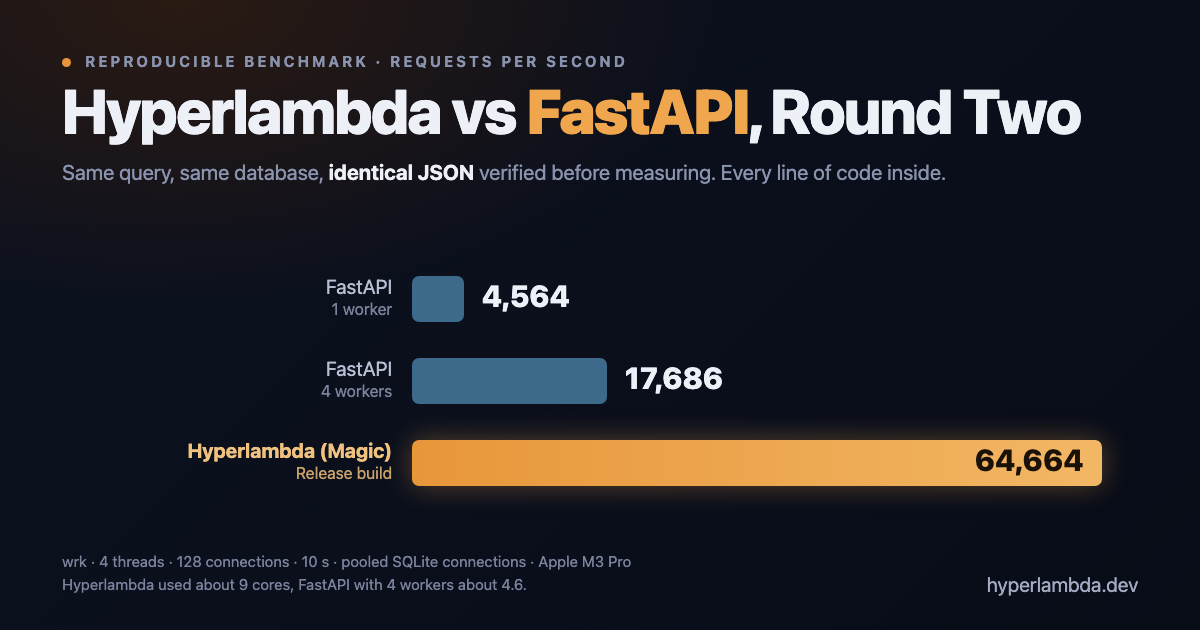
In August I published a benchmark claiming Hyperlambda was 20× faster than FastAPI, then rebuilt it more honestly. Today I spent the day making Magic faster, and then I did what that article promised: I ran the whole thing again, from a clean directory, on freshly built binaries.
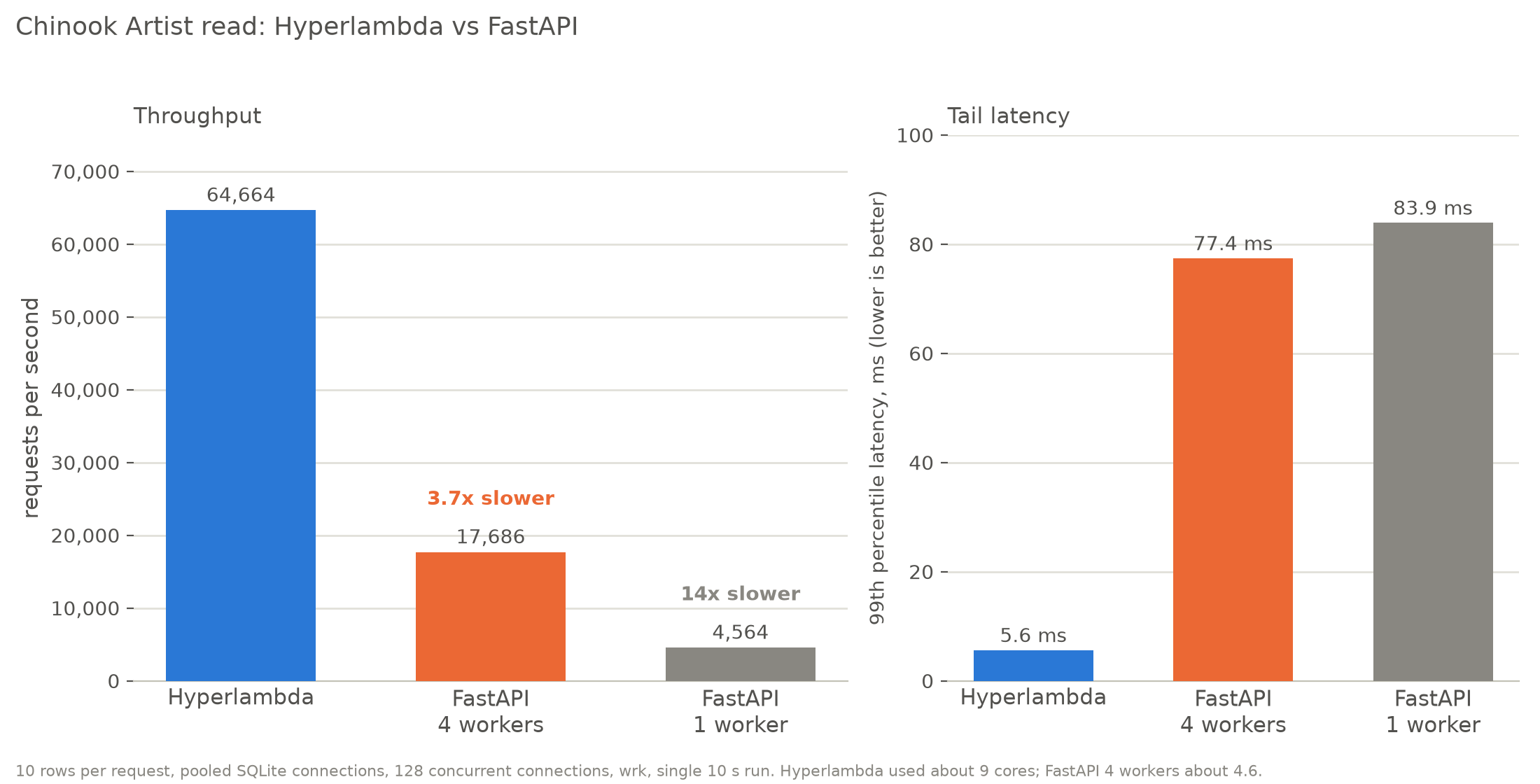
On a pooled Chinook database read, Hyperlambda served 64,664 requests per second. FastAPI on four worker processes served 17,686. FastAPI on one worker served 4,564. That is 3.7× and 14×, with identical JSON verified before a single request was measured.
The profiling code for both sides is in this article, in full: the FastAPI server, the three Hyperlambda endpoints, and the scripts that build Magic, start every server, check the responses and drive the load. If your numbers disagree with mine, publish them.
Two corrections
- The August benchmark gave Python a pooled database connection and Magic an unpooled one (Magic ships with
Pooling=False), and I didn't say so. Its "roughly twice as fast" figure is superseded by this article. - The October 21 energy article guessed that Python's dispatch overhead against Hyperlambda's was "tens-to-low-hundreds-times". Measured, it is 1.8× per core on a database read, and on a trivial endpoint FastAPI is the more efficient one per core. The guess is retracted. Its 16.92 million figure is a different, modelled quantity, and stands.
The numbers
Conditions for the headline: Chinook Artist table, first 10 rows ordered by ArtistId, pooled SQLite connections on both sides, wrk with 4 threads and 128 connections, 3 seconds of warm-up discarded, then 10 seconds measured. Responses are verified identical before measuring. No authentication on either side.
| Server | Req/s | p99 latency | Peak memory | CPU used | Req/s per core |
|---|---|---|---|---|---|
| Hyperlambda (one process, pooled) | 64,664 | 5.6 ms | 309 MB | 914% | 7,075 |
| FastAPI, 4 workers | 17,686 | 77.4 ms | 311 MB | 459% | 3,853 |
| FastAPI, 1 worker | 4,564 | 83.9 ms | 63 MB | 232% | 1,967 |
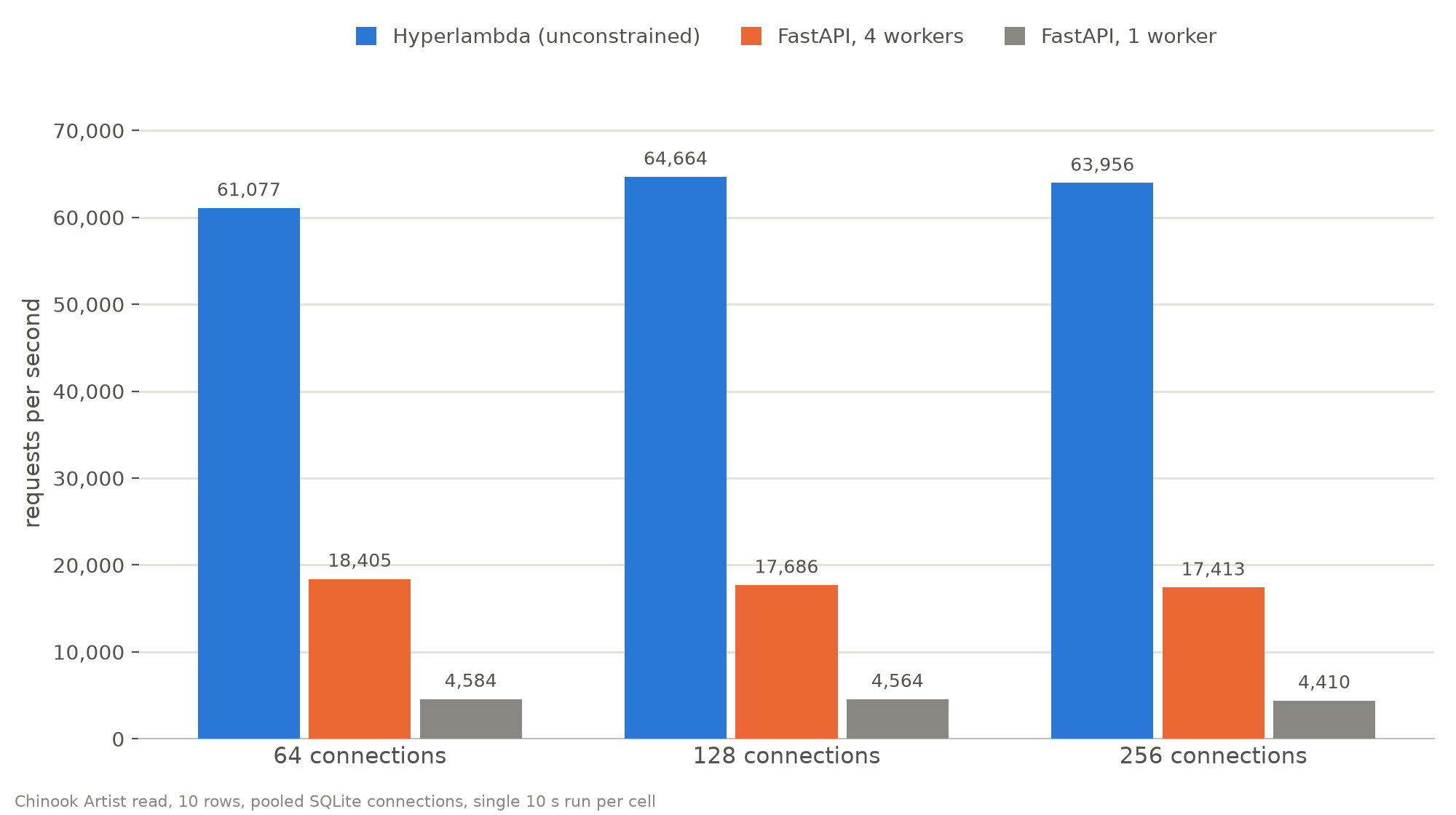
The ranking does not move across 64, 128 and 256 connections: Hyperlambda at 61,077, 64,664 and 63,956; FastAPI with four workers at 18,405, 17,686 and 17,413; FastAPI with one worker at 4,584, 4,564 and 4,410.
Three things in that table deserve a straight reading.
Hyperlambda used about twice the cores. It is one process that spreads over the machine, while four FastAPI workers used 4.6 cores. So "3.7× faster" is a whole-machine statement, and the fair per-core figure is 1.8×. I report both because either one alone would mislead you in a different direction.
More Python workers did not help. I ran the same read with 11 workers, one per core on this machine: 15,702, 10,778 and 10,448 requests per second at 64, 128 and 256 connections, and 820 MB of memory. That is slower than four workers, so four is not a handicap I chose for Python. I did not investigate why, and I only tried 1, 4 and 11, so a different worker count between them might do better.
Tail latency is the starkest difference. Hyperlambda's p99 is 5.6 ms. Both FastAPI configurations are between 70 and 90 ms at 128 connections.
How the numbers are measured
Everything below is in bench.py, and it is short enough to audit.
- Load.
wrkwith 4 threads,--timeout 10sand--latency, against one URL at a fixed connection count (64, 128 or 256). Each cell gets a 3-second warm-up that is thrown away, then a 10-second measured run.REPSrepeats the measured run and reports the mean. - Identical responses. Before any cell is measured, the script fetches each endpoint from each server, parses the JSON, and compares it with the first server's. A single difference aborts the run. This check exists because a payload mismatch once invalidated one of my own benchmarks.
- Memory. Every second during the measured run, it lists the server's whole process tree with
ps(uvicorn's workers are children of the launcher) and sums their resident memory. The table reports the peak. - CPU. The summed cumulative CPU time of that process tree is read before and after the run. Divide the difference by the wall-clock time and you get CPU use in percent of one core, so 914% means about 9.1 cores busy. Requests per second divided by that is the "per core" figure, and it is the one I trust when the two sides use different numbers of cores.
- Pooling. Magic reads its connection string from
files/config/appsettings.json, and that file wins over environment variables. The script editsPooling=in the instance's file for the duration of a run and restores it on exit. FastAPI switches between one connection per request and eight pooled connections per worker throughBENCH_POOLED. - Isolation. Each Magic build is its own clean instance: published binaries, an empty Magic database, the Chinook copy, and exactly three endpoints, with logging at
Warning. No MCP, no scheduler tasks, no demo databases. Servers run one at a time, never side by side.
Four traps I fell into while building this, each of which would have given a wrong number:
- Magic logs every request to the console unless you lower the level, which at 100,000 requests per second is gigabytes of log.
- Magic reads its configuration file after environment variables, so my first "pooled" run was not pooled.
- I once forced workstation garbage collection on Magic, which handicapped it badly. The numbers here use the shipped server GC.
- Flask's development server cannot keep connections alive, so a long run exhausts the operating system's ephemeral ports. I dropped it rather than report a number that measures the OS.
What I changed today
I spent the day on Magic's request path: removing a thread hand-off in the signal dispatcher, caching parsed endpoints, and trimming allocations in the scope stack and the parser. The commits are public, 27f6711...ffaaac7, and I'm deliberately not walking through them here, because this article is about how the numbers were measured. Same machine, same configuration and same test, before and after:
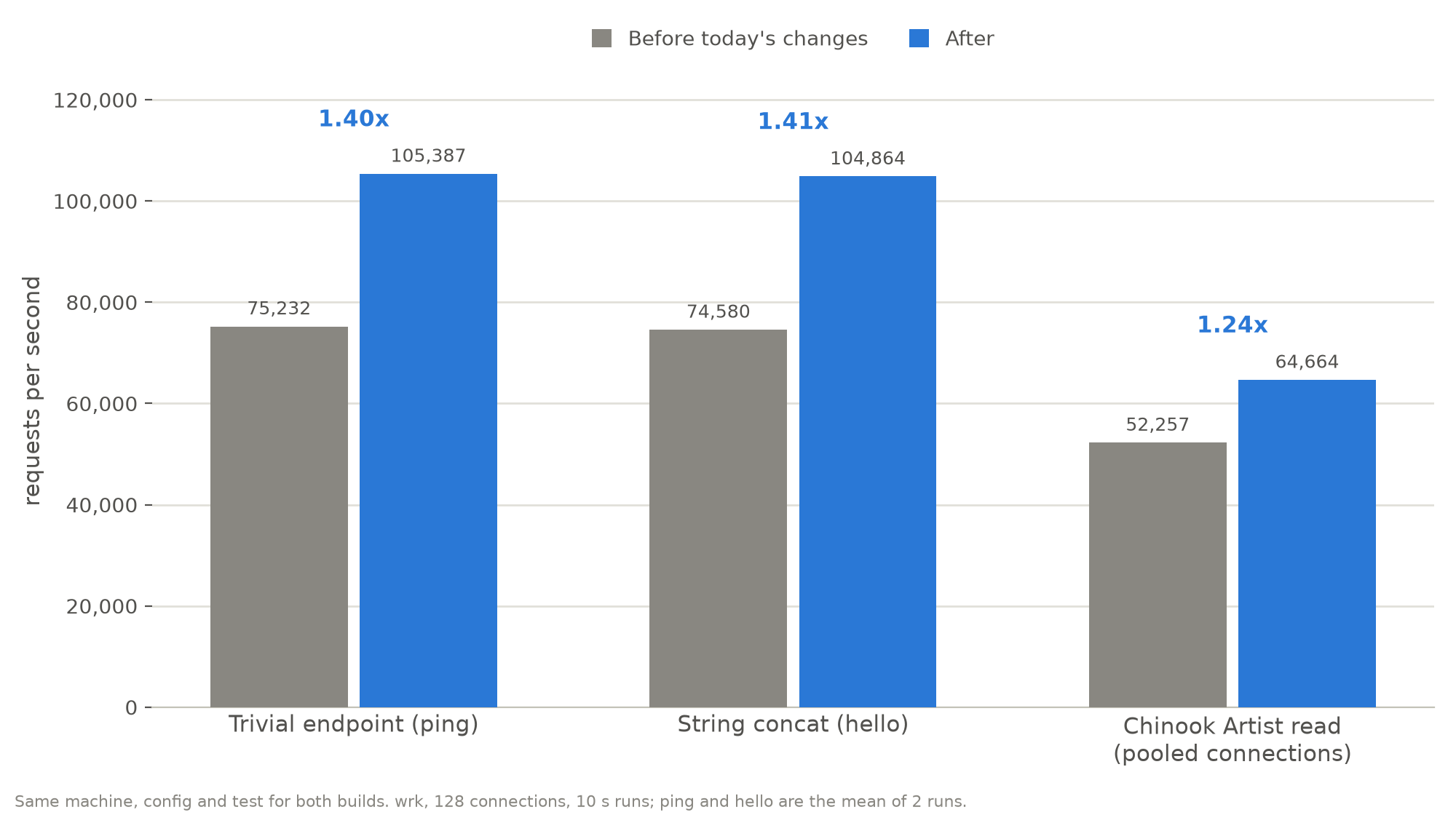
Roughly 1.4× on endpoints that do almost nothing, and 1.24× on the pooled database read. The code changes only speed up the request path. The bigger lever on a database read is not code at all.
Connection pooling
The biggest number in this article is not from any of the above. Magic's SQLite connection string ships with Pooling=False, so every database call opens and closes a connection. Same build, same test, 128 connections:
| Server | Per-request connections | Pooled | Gain |
|---|---|---|---|
| Hyperlambda | 4,232 | 62,003 | 14.7× |
| FastAPI, 4 workers | 6,245 | 17,564 | 2.8× |
| FastAPI, 1 worker | 1,877 | 4,775 | 2.5× |
Read the first column carefully. Out of the box, with per-request connections, FastAPI on four workers is faster than Magic on a database read. The headline numbers need Pooling=True, which is one word in appsettings.json. I think the default is worth revisiting, and I'm telling you now rather than leaving you to find it.
Why Hyperlambda is faster on this workload
What a single request does in each, once connections are pooled:
- Hyperlambda: Kestrel hands the request to the endpoint executor, which clones the cached lambda and runs
data.connectanddata.read. The SQLite call, the row materialisation and the JSON serialisation all happen in compiled .NET code, on whichever of the machine's cores the thread pool gives it. No global interpreter lock, no hand-off between threads for the query. - FastAPI with aiosqlite: uvicorn's event loop receives the request, and the handler awaits
aiosqlite. Each aiosqlite connection owns a thread, so every query is a hand-off from the event loop to that thread and back. Rows become Python dicts, andjson.dumpsruns in Python. Per process, the GIL serialises the Python parts, so throughput scales by adding processes, and each process has its own copy of the interpreter, its own connections and its own memory.
I haven't profiled the Python side, so that is my best explanation, not a measurement. The evidence for it is in the numbers: per core, Hyperlambda does 7,075 requests per second against 3,853 for FastAPI with four workers, and tail latency is an order of magnitude lower.
It is not an IO story. The Chinook database is 15 MB and lives in the page cache, so the read is CPU-bound, which is why connection pooling mattered so much and why a better thread model for waiting would not help.
And it is not a "Hyperlambda dispatch is faster than Python bytecode" story. Here is the same machine running a trivial string-concatenation endpoint on both:
| Server | Req/s | CPU used | Req/s per core |
|---|---|---|---|
| Hyperlambda | 99,805 | 822% | 12,141 |
| FastAPI, 4 workers | 84,584 | 385% | 21,970 |
| FastAPI, 1 worker | 20,645 | 100% | 20,645 |
When the endpoint does nothing but build a string, FastAPI's native-code HTTP stack (uvloop and httptools) is more efficient per core than Hyperlambda's interpreter plus Kestrel. Hyperlambda's lead appears when the request touches data, because there the whole path is compiled. That is a narrower claim than "n times faster than Python", and it is the one the measurements support.
Machine and software
| Machine | MacBook Pro (Mac15,6), Apple M3 Pro, 11 cores (5 performance and 6 efficiency), 18 GB RAM |
| OS | macOS 14.8 (23J21), on mains power, other applications closed |
| Load generator | wrk 4.2.0, on the same machine |
| .NET SDK | 10.0.107, Release build, server GC (the shipped backend.runtimeconfig.json) |
| Magic, before | commit 27f6711236783178d9e6775aac1fe4eaec3cb5e4 ("Tightening security") |
| Magic, after | commit ffaaac757b6702265d23a3c266f15ca35dc48618 ("Optimising") |
| Python | 3.13.9 |
| Python packages | fastapi 0.161.1, uvicorn 0.54.0, aiosqlite 0.22.1, uvloop 0.23.0, httptools 0.9.0, starlette 1.9.0, anyio 4.15.1 (all pinned in requirements.txt below) |
| Data | Chinook, built from the chinook.sql that Magic's sqlite-chinook plugin installs: Artist table with 275 rows and 5,658 name characters in total (the script refuses to continue if yours differs) |
Every way this is unfair, in both directions
Unfair to Python: Hyperlambda uses about twice the cores of the four-worker FastAPI, which is why I give per-core numbers next to totals. Magic's published endpoints also normally verify a JWT; these don't, and neither do the FastAPI ones, so this is the cheapest request Magic can serve.
Unfair to Hyperlambda:wrk runs on the same eleven cores as the server, which takes CPU from whichever side is fastest. Both Magic builds run with the logging level turned down to Warning, which a default install doesn't.
Fair, deliberately: every server returns identical parsed JSON for every endpoint, checked by the script before measuring and aborting on a mismatch. Both sides pool connections for the headline, and I show the unpooled numbers next to them. The Python side is async, uses uvloop and httptools, has no ORM and no middleware, and I tried 1, 4 and 11 workers.
Reproduce it
The profiling code below is everything you need. You need git, the .NET 10 SDK, Python 3.13, sqlite3, rsync, curl and wrk. The whole run takes about 20 minutes, most of it building Magic twice.
Magic does not ship with Chinook. The way you get it in Magic is to clone Magic, start it, and install the sqlite-chinook plugin, which drops chinook.sql into files/etc/sqlite/templates/; you then build the database from that script. By hand that is:
git clone https://github.com/polterguy/magic && cd magic/backend
dotnet run                                   # http://localhost:5000, login root / root
# dashboard > Plugins > install "sqlite-chinook", then:
sqlite3 files/data/chinook.db < files/etc/sqlite/templates/chinook.sql
setup.sh below does exactly that, unattended: it starts a default Magic from the repository's own backend/files, logs in as root, installs the plugin through the same install-plugin endpoint the dashboard calls, builds chinook.db from the SQL it installed, and stops Magic again. The Artist table it produces has 275 rows and 5,658 name characters, and the script refuses to continue if yours differs. Set CHINOOK_DB to skip the plugin step, and set MAGIC_START if you start Magic some other way than dotnet backend.dll from inside its folder; every Magic in the script, the bootstrap one and the benchmark ones, is launched with it.
mkdir hl-bench-files && cd hl-bench-files
# save setup.sh, bench.py, app.py and requirements.txt from below into this folder, then:
chmod +x setup.sh bench.py
export WORK=$HOME/hl-bench
./setup.sh                 # builds both commits, installs Chinook through Magic, creates instances, installs FastAPI
REPS=2 python3 bench.py    # prints one line per measurement; raw numbers go to $WORK/results.json
ONLY is a regular expression over ", so ONLY='fastapi-4' python3 bench.py runs just those cells.
setup.sh builds both commits from git archive, gets Chinook through Magic's own plugin as described above, creates a clean Magic instance for each build, and the FastAPI virtualenv:
#!/bin/bash
# Builds Magic "before" and "after", gets Chinook the way Magic does (start Magic, install the sqlite-chinook plugin),
# creates a clean instance of each build, and the FastAPI virtualenv.
# Needs: git, dotnet 10 SDK, python3.13, sqlite3, rsync, curl, wrk.
# MAGIC_START is how Magic is launched, from inside its folder (default "dotnet backend.dll"). CHINOOK_DB skips the plugin step.
set -euo pipefail
WORK="${WORK:-$HOME/hl-bench}"
REPO="${MAGIC_REPO:-https://github.com/polterguy/magic.git}"
BEFORE=27f6711236783178d9e6775aac1fe4eaec3cb5e4   # "Tightening security", the last commit before the optimisation work
AFTER=ffaaac757b6702265d23a3c266f15ca35dc48618    # "Optimising", the last commit of the day
HERE="$(cd "$(dirname "$0")" && pwd)"
MAGIC_START="${MAGIC_START:-dotnet backend.dll}"
mkdir -p "$WORK" && cd "$WORK"

# One bare, blob-less clone of the repository; git archive then fetches only the files it needs.
[ -d magic.git ] || git clone --quiet --bare --filter=blob:none "$REPO" magic.git

build() {   # build : publishes that commit's backend into publish-
  V=$1; COMMIT=$([ $V = before ] && echo $BEFORE || echo $AFTER)
  rm -rf "src-$V" "publish-$V" && mkdir "src-$V"
  git --git-dir=magic.git archive "$COMMIT" plugins backend/backend.csproj backend/Program.cs backend/Startup.cs backend/Properties backend/slots | tar -x -C "src-$V"
  (cd "src-$V" && dotnet publish backend/backend.csproj -c Release -o "$WORK/publish-$V" -v q)
}

build after
build before

# Magic ships without Chinook. Start a default Magic (the repository's own backend/files, login root/root), install the
# sqlite-chinook plugin through the same API the dashboard uses, and build the database from the SQL the plugin installs.
if [ -z "${CHINOOK_DB:-}" ]; then
  B="$WORK/bootstrap"; rm -rf "$B" && mkdir -p "$B"
  rsync -a --exclude files publish-after/ "$B/"
  git --git-dir=magic.git archive "$AFTER" backend/files | tar -x -C "$B" --strip-components=1
  stop_magic() { kill $(lsof -t -nP -iTCP:5200 -sTCP:LISTEN) 2>/dev/null || true; }   # whatever is listening on the bootstrap port
  (cd "$B" && ASPNETCORE_URLS=http://127.0.0.1:5200 bash -c "$MAGIC_START" > "$WORK/bootstrap.log" 2>&1 &)
  trap stop_magic EXIT
  for _ in $(seq 1 120); do curl -s -o /dev/null http://127.0.0.1:5200/magic/system/ping && break; sleep 1; done
  TOKEN=$(curl -s "http://127.0.0.1:5200/magic/system/auth/authenticate?username=root&password=root" | python3 -c 'import json,sys;print(json.load(sys.stdin)["ticket"])')
  curl -s -X POST http://127.0.0.1:5200/magic/system/bazar/install-plugin -H "Authorization: Bearer $TOKEN" -H "Content-Type: application/json" \
       -d '{"url":"https://ainiro.io/magic/modules/bazar/download-bazar-app?name=sqlite-chinook","name":"sqlite-chinook","type":"module"}' > /dev/null
  for _ in $(seq 1 120); do [ -f "$B/files/etc/sqlite/templates/chinook.sql" ] && break; sleep 1; done
  stop_magic; sleep 2
  rm -f "$WORK/chinook.db" && sqlite3 "$WORK/chinook.db" < "$B/files/etc/sqlite/templates/chinook.sql"
  CHINOOK_DB="$WORK/chinook.db"
fi
[ "$(sqlite3 "$CHINOOK_DB" 'select count(*), sum(length(Name)) from Artist')" = "275|5658" ] || { echo "Unexpected Artist table, expected 275 rows and 5,658 name characters"; exit 1; }

for V in before after; do
  rm -rf "magic-$V"

  # A clean instance: published binaries, a bare configuration, Magic's own empty database, Chinook, and the three endpoints.
  I="$WORK/magic-$V"
  mkdir -p "$I/files/config" "$I/files/data" "$I/files/modules/bench"
  rsync -a --exclude files "publish-$V/" "$I/"
  SECRET="$(python3 -c "import secrets,string;print(''.join(secrets.choice(string.ascii_letters+string.digits) for _ in range(137)))")"
  cat > "$I/files/config/appsettings.json" < /dev/null
  cp "$CHINOOK_DB" "$I/files/data/chinook.db"
  printf 'return-nodes\n   result:success\n' > "$I/files/modules/bench/ping.get.hl"
  printf '.arguments\n   name:string\nstrings.concat\n   .:"Hello there "\n   get-value:x:@.arguments/*/name\n   .:", and welcome to the farm"\nyield\n   result:x:@strings.concat\n' > "$I/files/modules/bench/hello.get.hl"
  printf 'data.connect:chinook\n   data.read\n      table:Artist\n      order:ArtistId\n      limit:long:10\n   return-nodes:x:@data.read/*\n' > "$I/files/modules/bench/artists.get.hl"
done

# FastAPI, pinned.
mkdir -p fastapi && cp "$HERE/app.py" "$HERE/requirements.txt" fastapi/ && cp "$CHINOOK_DB" fastapi/chinook.db
[ -d fastapi/.venv ] || { python3.13 -m venv fastapi/.venv && fastapi/.venv/bin/pip install -q -r fastapi/requirements.txt; }
echo "Setup done in $WORK"
app.py is the FastAPI server. This is the entire thing:
"""FastAPI on uvicorn: async handlers, aiosqlite, uvloop and httptools. BENCH_POOLED=1 keeps 8 open connections per
worker process; without it, every request opens and closes its own connection."""
import asyncio, contextlib, json, os
import aiosqlite
from fastapi import FastAPI
from fastapi.responses import Response

DB = os.environ["BENCH_DB"]
POOLED = os.environ.get("BENCH_POOLED") == "1"
_pool = None


@contextlib.asynccontextmanager
async def lifespan(_):
    global _pool
    if POOLED:
        _pool = asyncio.Queue()
        for _ in range(8):
            conn = await aiosqlite.connect(DB)
            conn.row_factory = aiosqlite.Row
            _pool.put_nowait(conn)
    yield
    if POOLED:
        while not _pool.empty():
            await _pool.get_nowait().close()


@contextlib.asynccontextmanager
async def connection():
    if POOLED:
        conn = await _pool.get()
        try:
            yield conn
        finally:
            _pool.put_nowait(conn)
    else:
        async with aiosqlite.connect(DB) as conn:
            conn.row_factory = aiosqlite.Row
            yield conn


app = FastAPI(docs_url=None, redoc_url=None, openapi_url=None, lifespan=lifespan)


def json_response(value):
    return Response(json.dumps(value), media_type="application/json")


@app.get("/ping")
async def ping():
    return json_response({"result": "success"})


@app.get("/hello")
async def hello(name: str):
    return json_response({"result": "Hello there " + name + ", and welcome to the farm"})


@app.get("/artists")
async def artists():
    async with connection() as conn:
        async with conn.execute("select * from Artist order by ArtistId limit 10") as cursor:
            return json_response([dict(r) for r in await cursor.fetchall()])
requirements.txt:
aiosqlite==0.22.1
annotated-doc==0.0.5
annotated-types==0.8.0
anyio==4.15.1
click==8.5.0
fastapi==0.161.1
h11==0.16.0
httptools==0.9.0
idna==3.20
pydantic==2.14.1
pydantic_core==2.50.1
python-dotenv==1.2.4
PyYAML==6.0.3
starlette==1.9.0
typing-inspection==0.4.4
typing_extensions==4.16.0
uvicorn==0.54.0
uvloop==0.23.0
watchfiles==1.3.0
websockets==17.3
bench.py starts each server in turn, verifies identical payloads, drives wrk, samples memory and CPU through ps, and prints the numbers behind every chart in this article:
#!/usr/bin/env python3
"""Starts each server in turn, checks they return identical JSON, drives them with wrk, samples memory and CPU, and
prints the numbers behind the three charts. Standard library only.   WORK=~/hl-bench REPS=2 python3 bench.py"""
import atexit, json, os, re, resource, shlex, signal, statistics, subprocess, sys, threading, time, urllib.request
from pathlib import Path

WORK = Path(os.environ.get("WORK", Path.home() / "hl-bench"))
REPS = int(os.environ.get("REPS", "2"))
SECONDS, WARMUP = 10, 3
resource.setrlimit(resource.RLIMIT_NOFILE, (10240, 10240))

PATHS = {"ping": "/ping", "hello": "/hello?name=Thomas", "artists": "/artists"}


def magic(version, port):
    return dict(cwd=WORK / f"magic-{version}", cmd=shlex.split(os.environ.get("MAGIC_START", "dotnet backend.dll")), port=port, prefix="/magic/modules/bench",
                env={"ASPNETCORE_URLS": f"http://127.0.0.1:{port}"}, appsettings=WORK / f"magic-{version}/files/config/appsettings.json")


def fastapi(workers, port):
    return dict(cwd=WORK / "fastapi", port=port, prefix="", appsettings=None,
                cmd=[".venv/bin/uvicorn", "app:app", "--host", "127.0.0.1", "--port", str(port), "--workers", str(workers),
                     "--loop", "uvloop", "--http", "httptools", "--no-access-log", "--log-level", "error"],
                env={"BENCH_DB": str(WORK / "fastapi/chinook.db"), "PORT": str(port)})


TARGETS = {"magic-before": magic("before", 5098), "magic-after": magic("after", 5097),
           "fastapi-4": fastapi(4, 5102), "fastapi-1": fastapi(1, 5103), "fastapi-11": fastapi(11, 5104)}

# target, pooled connections?, workloads, connection counts
PLAN = [("magic-before", False, ["ping", "hello"], [128]), ("magic-before", True, ["artists"], [128]),
        ("magic-after", False, ["ping", "hello"], [128]), ("magic-after", True, ["artists"], [64, 128, 256]),
        ("fastapi-4", True, ["artists"], [64, 128, 256]), ("fastapi-1", True, ["artists"], [64, 128, 256]),
        # Context: no pooling anywhere, a trivial endpoint, and FastAPI with one worker per core (this machine has 11).
        ("magic-after", False, ["artists"], [128]), ("fastapi-4", False, ["artists"], [128]), ("fastapi-1", False, ["artists"], [128]),
        ("fastapi-4", True, ["hello"], [128]), ("fastapi-1", True, ["hello"], [128]), ("fastapi-11", True, ["artists"], [64, 128, 256])]


def get(url, timeout=2):
    with urllib.request.urlopen(url, timeout=timeout) as r:
        return r.status, r.read()


def tree(pid):
    rows = [l.split() for l in subprocess.run(["ps", "-A", "-o", "pid=,ppid="], capture_output=True, text=True).stdout.splitlines()]
    kids = {}
    for p, pp in rows:
        kids.setdefault(int(pp), []).append(int(p))
    out, todo = [], [pid]
    while todo:
        out.append(todo[0])
        todo += kids.get(todo.pop(0), [])
    return out


def sample(pid):
    out = subprocess.run(["ps", "-o", "rss=,cputime=", "-p", ",".join(map(str, tree(pid)))], capture_output=True, text=True).stdout
    rss = cpu = 0.0
    for line in out.splitlines():
        r, c = line.split()
        secs = 0.0
        for piece in c.split(":"):
            secs = secs * 60 + float(piece)
        rss, cpu = rss + int(r) / 1024, cpu + secs
    return rss, cpu


class Server:
    def __init__(self, name, spec):
        self.name, self.spec = name, spec
        self.base = f"http://127.0.0.1:{spec['port']}{spec['prefix']}"

    def start(self):
        log = open(WORK / f"{self.name}.log", "w")
        self.proc = subprocess.Popen(self.spec["cmd"], cwd=self.spec["cwd"], env=dict(os.environ, **self.spec["env"]),
                                     stdout=log, stderr=log, start_new_session=True)
        for _ in range(240):
            try:
                if get(self.base + "/ping")[0] == 200:
                    return
            except Exception:
                time.sleep(0.5)
        sys.exit(f"{self.name} did not start, see {WORK}/{self.name}.log")

    def stop(self):
        os.killpg(self.proc.pid, signal.SIGTERM)
        self.proc.wait(timeout=30)
        time.sleep(1)


def wrk(server, path, connections, seconds):
    cmd = ["wrk", f"-t4", f"-c{connections}", f"-d{seconds}s", "--timeout", "10s", "--latency", server.base + path]
    peak, stop = [0.0], threading.Event()

    def sampler():
        while not stop.is_set():
            peak[0] = max(peak[0], sample(server.proc.pid)[0])
            stop.wait(1.0)

    _, cpu0 = sample(server.proc.pid)
    t0 = time.time()
    threading.Thread(target=sampler, daemon=True).start()
    out = subprocess.run(cmd, capture_output=True, text=True).stdout
    elapsed = time.time() - t0
    stop.set()
    _, cpu1 = sample(server.proc.pid)
    num = lambda pattern: float(re.search(pattern, out).group(1))
    p99 = re.search(r"99%\s+([\d.]+)(us|ms|s)", out)
    p99_ms = float(p99.group(1)) * {"us": 0.001, "ms": 1, "s": 1000}[p99.group(2)]
    errors = re.search(r"Non-2xx or 3xx responses: (\d+)", out)
    return dict(rps=num(r"Requests/sec:\s+([\d.]+)"), p99_ms=p99_ms, errors=int(errors.group(1)) if errors else 0,
                rss_mb=peak[0], cpu_percent=100 * (cpu1 - cpu0) / elapsed)


def main():
    reference, results = {}, {}
    for name, pooled, workloads, levels in PLAN:
        if not re.search(os.environ.get("ONLY", ""), f"{name} pooled={pooled} {workloads}"):
            continue   # ONLY is a regular expression, for running part of the plan
        server = Server(name, TARGETS[name])
        cfg = server.spec["appsettings"]
        if cfg:   # Magic reads its connection string from this file, so it is edited for the run and restored afterwards
            original = cfg.read_text()
            atexit.register(lambda c=cfg, o=original: c.write_text(o))
            cfg.write_text(original.replace("Pooling=False", f"Pooling={pooled}"))
        if not cfg:   # FastAPI chooses between one connection per request and a pool through an environment variable
            server.spec["env"]["BENCH_POOLED"] = "1" if pooled else "0"
        server.start()
        for w in workloads:
            body = json.loads(get(server.base + PATHS[w])[1])    # every server must return the same JSON
            if reference.setdefault(w, body) != body:
                sys.exit(f"{name} returned a different payload for {w}")
            for c in levels:
                wrk(server, PATHS[w], c, WARMUP)
                runs = [wrk(server, PATHS[w], c, SECONDS) for _ in range(REPS)]
                cell = {k: round(statistics.mean(r[k] for r in runs), 1) for k in runs[0]}
                results.setdefault(name + (" (pooled)" if pooled else " (unpooled)"), {})[f"{w}@{c}"] = cell
                print(f"{name:13} pooled={pooled!s:5} {w:8} c={c:<4} {cell['rps']:>9,.0f} req/s  p99 {cell['p99_ms']:>6.1f} ms  "
                      f"rss {cell['rss_mb']:>4.0f} MB  cpu {cell['cpu_percent']:>4.0f}%  errors {cell['errors']:.0f}", flush=True)
        server.stop()
        if cfg:
            cfg.write_text(original)
    (WORK / "results.json").write_text(json.dumps(results, indent=2))
    print(f"\nPayloads identical on every server. Raw numbers in {WORK}/results.json")


main()
The three Hyperlambda endpoints that setup.sh writes are, in full. This is all the Hyperlambda there is:
// ping.get.hl
return-nodes
   result:success

// hello.get.hl
.arguments
   name:string
strings.concat
   .:"Hello there "
   get-value:x:@.arguments/*/name
   .:", and welcome to the farm"
yield
   result:x:@strings.concat

// artists.get.hl
data.connect:chinook
   data.read
      table:Artist
      order:ArtistId
      limit:long:10
   return-nodes:x:@data.read/*
What I get when I run it from scratch
The charts in this article come from my earlier runs. After finishing them I ran the scripts above, from an empty directory, with two fresh Release builds and one repetition per cell. It agrees with the charts within about 5%, and the differences are all in the direction you would expect from run-to-run noise on a laptop:
| Measurement | Before | After |
|---|---|---|
ping, 128 connections | 73,061 | 100,118 |
hello, 128 connections | 71,394 | 99,805 |
Pooled Artist read, 128 connections | 47,055 | 62,003 |
Pooled Artist read | 64 conn | 128 conn | 256 conn |
|---|---|---|---|
| Hyperlambda | 59,911 | 62,003 | 61,770 |
| FastAPI, 4 workers | 18,343 | 17,564 | 16,793 |
| FastAPI, 1 worker | 4,864 | 4,775 | 4,742 |
| FastAPI, 11 workers | 15,702 | 10,778 | 10,448 |
That is 3.5× against four workers and 13× against one in the from-scratch run, against 3.7× and 14× in the charts. Expect yours to land in that range, and expect macOS thermal state, background indexing and the efficiency cores to move individual cells by a few percent.
How much code it takes: token counts
Everything above is about runtime. There is a second cost to an endpoint, and it matters if an AI agent writes your backend: how many tokens it takes to write it. So I counted them, for exactly the endpoint in this benchmark, the Chinook Artist read.
Three versions, all returning the same ten rows. I checked that: both Python versions return JSON identical to Magic's response.
- Hyperlambda: the
artists.get.hlfile from above. Six lines. - Python, simplest FastAPI: what most people write first. Synchronous
sqlite3, a new connection per request. - Python, as benchmarked: the same logic as the benchmarked server for this one endpoint: async,
aiosqlite, eight pooled connections per worker.
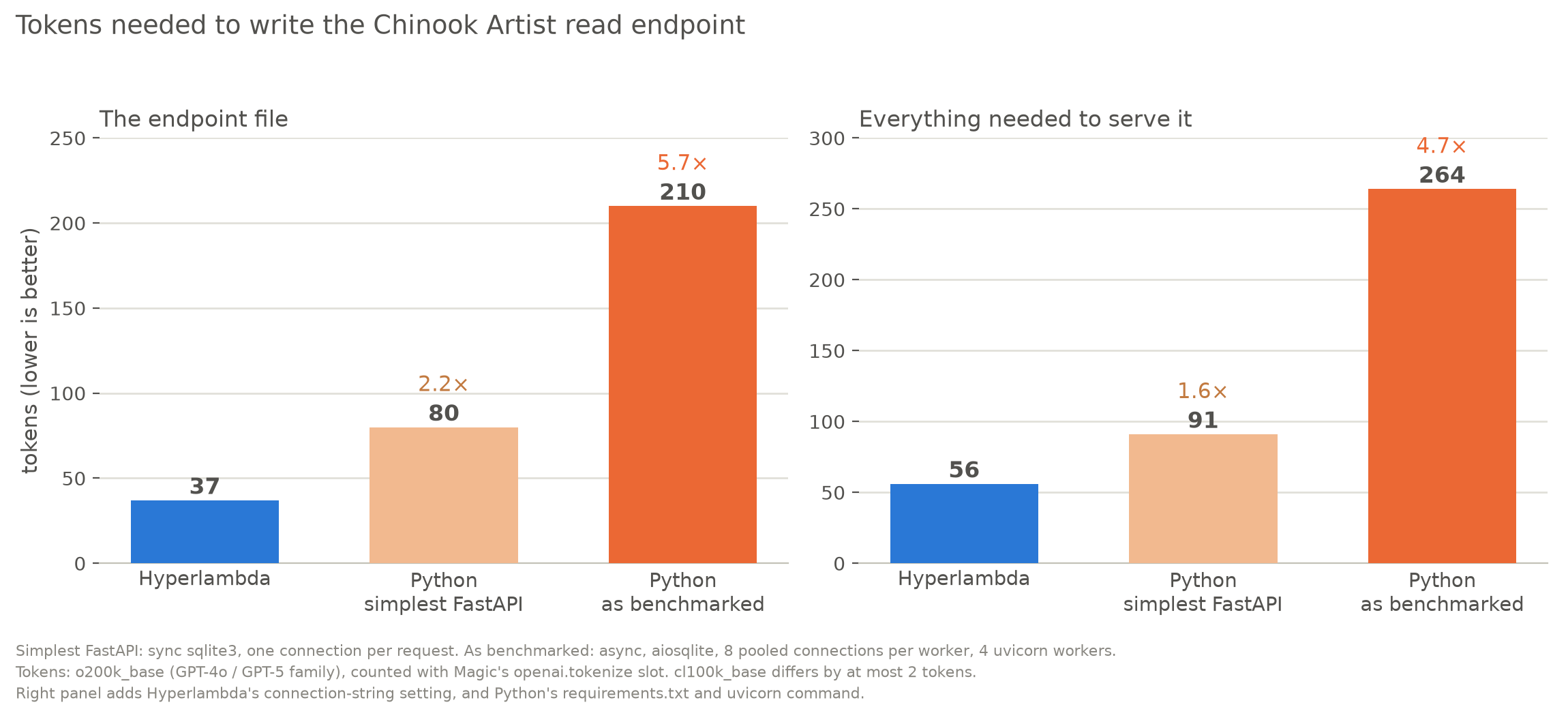
| What is counted | Hyperlambda | Python, simplest FastAPI | Python, as benchmarked |
|---|---|---|---|
| The endpoint file, tokens | 37 | 80 (2.2×) | 210 (5.7×) |
| The endpoint file, lines | 6 | 13 | 31 |
| The endpoint file, characters | 125 | 308 | 862 |
| Plus the rest needed to serve it, tokens | 56 | 91 (1.6×) | 264 (4.7×) |
"The rest" is, for Hyperlambda, the connection string with pooling switched on (Data Source=files/data/{database}.db; Pooling=True; Default Timeout=5;, 19 tokens). For Python it is requirements.txt and the uvicorn command line, which for the benchmarked version is uvicorn app:app --host 127.0.0.1 --port 5102 --workers 4 --loop uvloop --http httptools --no-access-log --log-level error, 41 tokens on its own. Tokens are o200k_base, the encoding of the GPT-4o and GPT-5 family; cl100k_base gives 37, 80 and 208 for the three files, so the picture does not depend on which one you pick.
The two Python files, in full:
import sqlite3
from fastapi import FastAPI

app = FastAPI()


@app.get("/artists")
def artists():
    con = sqlite3.connect("chinook.db")
    con.row_factory = sqlite3.Row
    rows = con.execute("select * from Artist order by ArtistId limit 10").fetchall()
    con.close()
    return [dict(r) for r in rows]
import asyncio, contextlib, json
import aiosqlite
from fastapi import FastAPI
from fastapi.responses import Response

_pool = asyncio.Queue()


@contextlib.asynccontextmanager
async def lifespan(_):
    for _ in range(8):
        conn = await aiosqlite.connect("chinook.db")
        conn.row_factory = aiosqlite.Row
        _pool.put_nowait(conn)
    yield
    while not _pool.empty():
        await _pool.get_nowait().close()


app = FastAPI(docs_url=None, redoc_url=None, openapi_url=None, lifespan=lifespan)


@app.get("/artists")
async def artists():
    conn = await _pool.get()
    try:
        async with conn.execute("select * from Artist order by ArtistId limit 10") as cursor:
            rows = [dict(r) for r in await cursor.fetchall()]
    finally:
        _pool.put_nowait(conn)
    return Response(json.dumps(rows), media_type="application/json")
How the tokens were counted. With Magic itself, so there is nothing to install: Magic's openai.tokenize slot counts with a tokenizer vocabulary bundled in the plugin. With the bootstrap Magic from setup.sh running on port 5200, copy the files into its files/etc/tokens/ folder and evaluate this through the root-only evaluator endpoint:
TOKEN=$(curl -s "http://127.0.0.1:5200/magic/system/auth/authenticate?username=root&password=root" | python3 -c 'import json,sys;print(json.load(sys.stdin)["ticket"])')
curl -s -X POST http://127.0.0.1:5200/magic/system/evaluator/evaluate \
  -H "Authorization: Bearer $TOKEN" -H "Content-Type: application/json" \
  -d '{"hyperlambda":"io.file.load:/etc/tokens/artists.get.hl\nopenai.tokenize:x:@io.file.load"}'
# the response ends with:  openai.tokenize:int:37
# add "\n   model:gpt-4" as a child of openai.tokenize to count with cl100k_base
What the difference means
The number depends on which Python you hold up against Hyperlambda, and I would rather you see all three than have me pick. Against the simplest Python the difference is 2.2× on the endpoint file, and 1.6× once you count everything it takes to serve it. Against the Python that does what the benchmarked Magic does (async, pooled, several workers), the difference is 5.7×, and 4.7× with the rest.
That second comparison is the fair one for this article, because it is the version that was benchmarked, and the gap is the whole story of what a platform is: pooling, async and process management are things Python makes you write or configure and Magic ships as settings and defaults. The six lines of Hyperlambda say what to read: connection, table, order, limit. The 31 lines of Python also say how to share connections, when to open them, how to close them, and how to serialise the result.
Why it matters is mostly about AI-written code. Every token an agent generates is paid for, adds latency, and is a place to be wrong, and every line is something a human has to review. Between a half and a fifth of the tokens for the same endpoint is a real saving, and it points the same way as How Magic Cuts Backend Build Cost by ~80% in Agentic Workflows, though this table measures one endpoint and that article measures a whole build.
But token count is not cost, and I don't want to oversell it:
- It counts the output, not the prompt. A model writing Hyperlambda needs the vocabulary described to it, or the Hyperlambda Generator, and those tokens are not in this table. Models know Python from training; Hyperlambda they have to be taught.
- It is one tiny endpoint. I haven't measured a read with paging, filtering and authentication, and the ratio does not necessarily extrapolate in either direction.
- Short is not the same as better. Hyperlambda is short partly because the platform does the work, which is also a dependency on the platform. The simplest Python is also the one that performed worst in the benchmark.
- These are OpenAI tokenizers. I have not counted with Anthropic's, so expect different absolute numbers, and I have no measurement for whether the ratios hold there.
What this does not prove
One table, one read of ten rows, on localhost, on one laptop, with the load generator sharing the machine. It says nothing about writes, joins, large payloads, a network between the client and the server, or anything with authentication in the path. Hyperlambda's advantage depends on the request touching data and on pooling being on, as the string-concatenation numbers above show. The Python numbers are specific to FastAPI on uvicorn with aiosqlite, which is one reasonable stack among many, and another SQLite driver could shift them.
And I wrote this benchmark, I wrote Magic, and I spent the day making Magic faster. Vendor benchmarks are guilty until replicated. The scripts are above for exactly that reason.
Frequently asked questions
Is Hyperlambda faster than FastAPI?
On a pooled database read, yes: 64,664 requests per second against 17,686 for FastAPI on four workers and 4,564 on one, with p99 latency of 5.6 ms against 77 to 84 ms. On a trivial string-concatenation endpoint the gap is small, and FastAPI is more efficient per core.
How many times faster is Hyperlambda than FastAPI?
3.7× against four FastAPI workers and 14× against one on a pooled read of ten rows, at 128 connections. Per CPU core the gap is 1.8× against four workers, because Hyperlambda used about twice the cores.
Why is this different from your earlier Hyperlambda vs FastAPI article?
The earlier benchmark used a Debug build, JWT authentication on Magic only, and an unpooled Magic connection against a pooled Python one, and read 275 rows. Today's uses a Release build, no authentication on either side, pooling on both, and ten rows. The two articles should not be combined.
Does Hyperlambda need connection pooling to be fast?
Yes. With Magic's shipped Pooling=False the same read does 4,232 requests per second, which is slower than FastAPI on four workers (6,245 with per-request connections). Turning pooling on takes it to 62,003.
How do I reproduce the benchmark?
Save the four files in the article, run ./setup.sh and then python3 bench.py. The setup builds both Magic commits, starts Magic and installs the sqlite-chinook plugin to get the Chinook database, and the benchmark verifies identical responses and prints every number used in the charts.
Related reading
- Hyperlambda vs FastAPI: An Honest, Reproducible Benchmark
- Python AI Agents Burn 16.92M× More Energy Than Hyperlambda
- 2 + 2 = 17,000,000x: The Hidden Energy Cost of AI Agents Talking to Sandboxes
- Magic vs PocketBase: An Honest Feature Matrix