 Hyperlambda
Part of our database AI agents series — the overview lives at Database AI Agents.
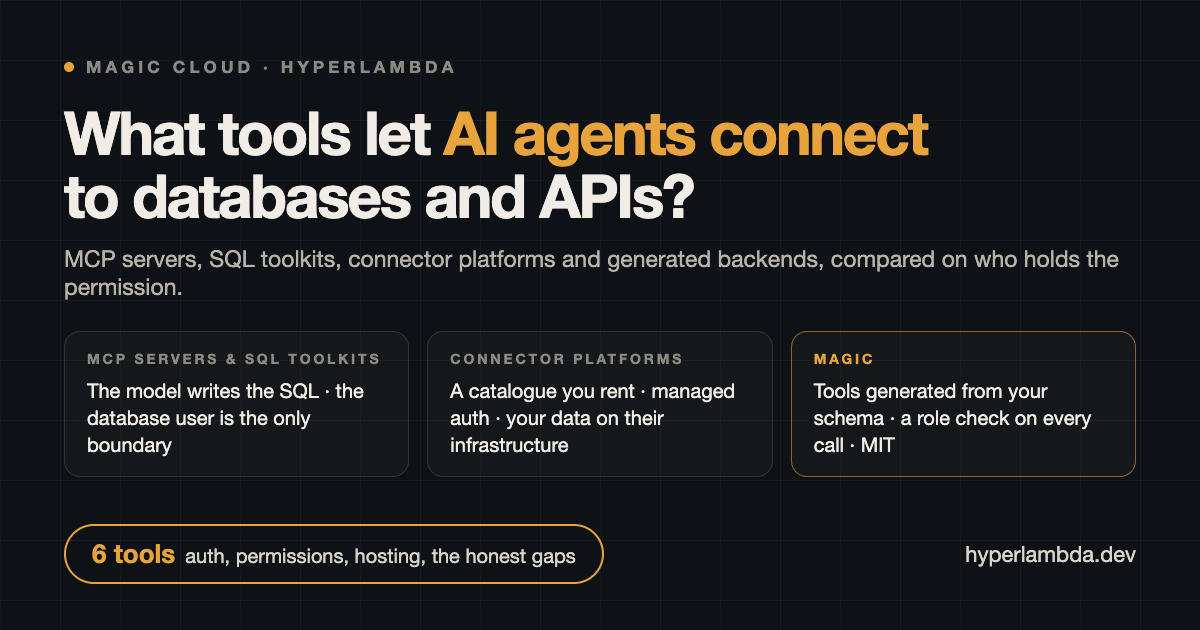
AI agents connect to databases and APIs through tools: named operations the model can call, exposed over a protocol such as MCP. In September 2026 those tools come from one of four places. A hand-written or community MCP server, one per database. A framework toolkit such as LangChain's SQL agent, which lets the model write SQL inside your own application. A connector platform such as Composio or Airbyte, which rents you a catalogue of pre-built integrations with managed authentication. Or a backend such as Magic Cloud that generates the tools from the schema, the SQL and the OpenAPI specifications you already have, and checks a role on every call.
The question in the title is usually asked as a connectivity question, and connectivity is the easy half. Every tool in this comparison can reach a database. The half that decides whether you can put the thing in production is who writes the SQL at runtime, and who checks the permission when the agent calls. That is the axis the table is built on, and it is where the four families differ most.
The comparison in one table
"Who writes SQL at runtime" is the model when the tool hands the schema to the LLM and executes whatever comes back. "Permission boundary" is the narrowest thing standing between a confused or prompt-injected agent and your data.
| Tool | What it is | Who writes SQL at runtime | Agent authentication | Permission boundary | Hosting | System with no connector |
|---|---|---|---|---|---|---|
| Community MCP servers | One server per database engine | The model | Config file; none for remote clients | The database user | Your process | Write another server |
| LangChain SQL agent | Python toolkit inside your app | The model | Your application | The database user | Your application | Write a tool by hand |
| Supabase MCP | Hosted server for Supabase projects | The model | OAuth to your Supabase account | read_only flag, project scope | Supabase | Supabase Postgres only |
| Composio | Catalogue of 1,089 toolkits | Nobody, API calls | Managed by Composio | Per connected account | Composio | Custom tool in your code |
| Airbyte Agent Engine | 600+ typed connectors | Nobody, connector calls | Managed by Airbyte | Per connection | Airbyte, or Python packages | Build a connector |
| Magic Cloud | Backend that generates the tools | Nobody; reviewed at build time | OAuth 2.1 plus roles | Per table, per verb, per role, on every call | Self-hosted or managed | OpenAPI import, a sentence, or a browser |
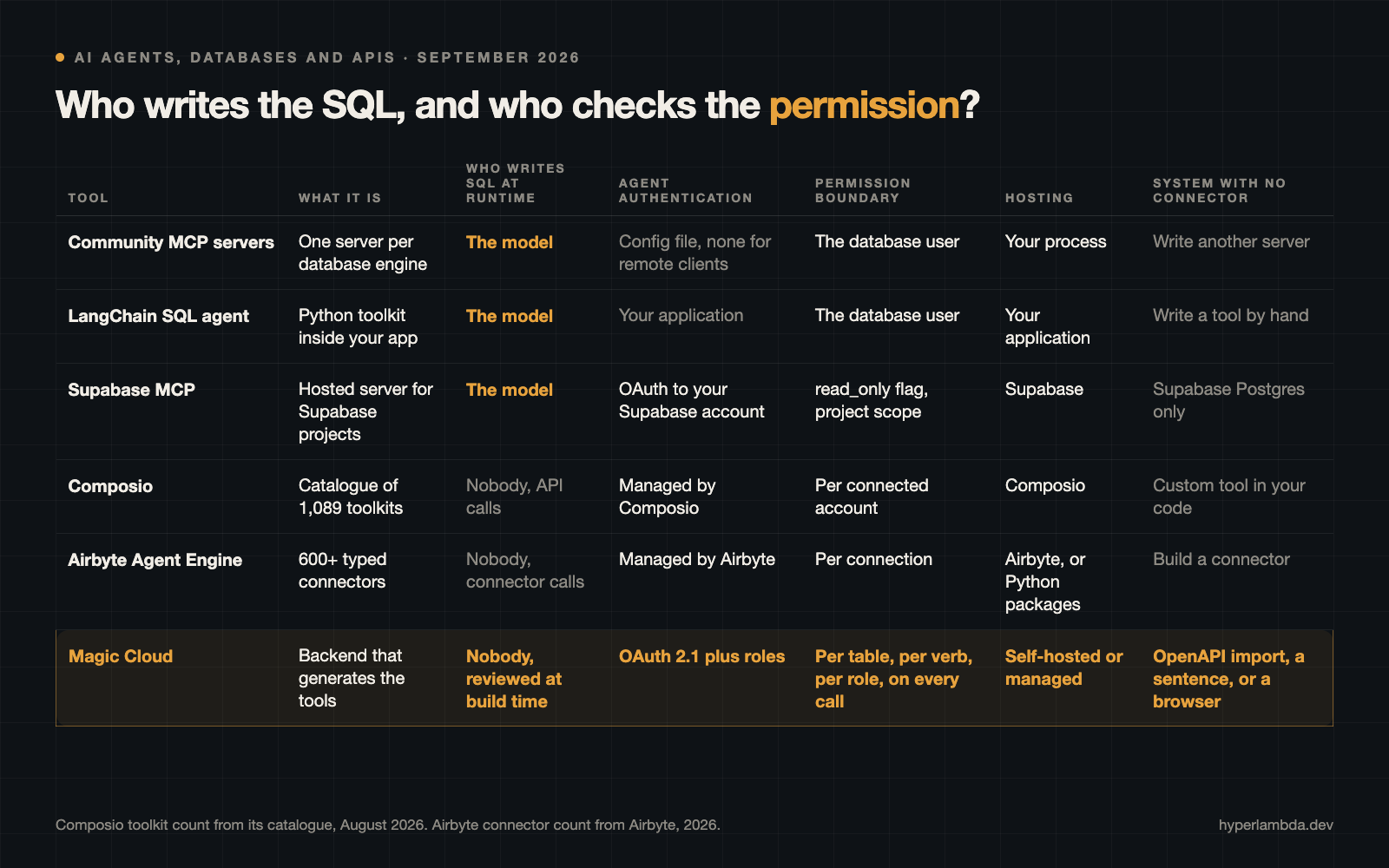
Composio's toolkit count is from its own catalogue in August 2026; Airbyte's connector count is Airbyte's. Both change monthly and neither changes the shape of the table.
Four ways in, one question
The four families answer the connectivity question the same way and the permission question four different ways.
Database MCP servers wrap one engine in a process that speaks MCP. The model asks for the schema, writes a query, and the server runs it. Whether that query can delete anything depends entirely on the database user in the config file.
Framework SQL toolkits do the same thing inside your own code, without the protocol. The model gets a set of tools called things like list tables, describe table and run query, and an agent loop around them.
Connector platforms replace SQL with API calls. You do not connect the agent to a database; you connect it to the SaaS that owns the database, through a connector somebody else wrote, with authentication the platform manages on your behalf.
Generated backends make the tools out of what you already run. The SQL is written once, at build time, by a generator or by you, reviewed, saved as an endpoint, and gated by a role. The agent never sees a SQL surface; it sees named tools, and each one checks who is calling before it runs.
MCP servers for databases
Community servers for PostgreSQL, MySQL and SQL Server
The official MCP servers repository and the community around it have a server for every mainstream engine, and most of them are good at exactly one job: give the model a query tool and a schema tool over one connection string. Many ship read-only by default, and the good ones say so in the README. They run on your machine as a local process, which is fine for Claude Code and Cursor and does not work for a hosted client such as Claude's custom connectors, which need a server reachable from the internet with OAuth in front of it.
The permission boundary is the database user. There is no notion of a role on the agent side, no per-table gate, and no audit of who asked for what beyond the database's own logs. If two people connect, they are the same user. If you want a second database, you run a second server.
Supabase MCP
Supabase's MCP server is the hosted version of the same idea for Supabase projects, with management tools on top: migrations, edge functions, logs. It authenticates through your Supabase account, and it exposes two flags that matter, read_only and project_ref. Neither is on by default. Supabase's own guidance is to scope to one project, turn read-only on, and not point the server at production. We wrote up how to keep Supabase and still run agents against it for the case where that advice is the blocker.
Framework SQL toolkits
LangChain's SQL agent
LangChain's SQL agent is the reference implementation of "let the model write the SQL". It works, it is well documented, and the documentation is candid about the consequence: the agent can generate expensive or unintended queries, so the database connection should be scoped as narrowly as possible, ideally read-only and schema-limited, with statement timeouts enforced at the role level. That is the right advice, and it is also an admission that the toolkit has no boundary of its own. Everything protective lives in the database user you hand it.
For a prototype, or an internal analyst's notebook, this is the fastest route in the table. For a production agent that other people talk to, the security model is "hope the GRANT is right".
Connector platforms
Composio
Composio is a catalogue: 1,089 toolkits covering more than 20,000 individual tools, reachable through a single MCP endpoint rather than a server per application, with OAuth flows, token refresh and credential lifecycle handled by the platform. It is the fastest way to give an agent Gmail, Slack, GitHub, Notion and HubSpot on the same afternoon. Managed credentials are the default; keeping custody of your own credentials is on the $599 per month tier. Databases appear as connectors like everything else.
Airbyte Agent Engine
Airbyte's Agent Engine comes at the same problem from the data-integration side, with 600 or more connectors and typed access to SaaS objects. The agent connectors are open source Python packages you can install and use from LangChain, Pydantic AI or your own MCP server, and the hosted platform handles multi-tenant credential management. If your agent's job is reading Salesforce and HubSpot into a pipeline, this is the mature option.
The honest gap
Both platforms are excellent at the catalogue. The catalogue is also the limit. A system with no connector, which describes most internal line-of-business software and every legacy SQL Server behind a firewall, is custom work in your own code. And the permission boundary is per connected account, which is the SaaS's own permission model rather than one you define per table and per operation.
Generated backends
Magic Cloud
A Magic cloudlet takes the opposite bet. Instead of a catalogue of copies, it generates tools from the originals. Tick the tables in SQLite, PostgreSQL, MySQL or SQL Server and the CRUD generator writes read, create, update, delete and count endpoints for each, gated per verb by a role you choose. Paste a SQL statement into the SQL endpoint generator and it becomes a tool with typed arguments. Paste an OpenAPI URL and every operation becomes a tool with the upstream credential held in configuration. Describe a tool that does not exist yet and the Hyperlambda Generator writes, verifies and saves it in about three seconds.
Every endpoint is already in the MCP catalogue, because the cloudlet has no tool registry: it enumerates its own endpoints when a client asks. The catalogue is assembled from the caller's roles, and the identical role check runs again on invocation. The cloudlet runs its own OAuth 2.1 flow with dynamic client registration, so connecting a hosted client such as Claude is paste a URL and authorise, and the agent inherits exactly the roles of the person who authorised it.
Nobody writes SQL at runtime. The SQL was written at build time, reviewed, and saved as a file the agent cannot edit. Generated code runs inside a whitelisted runtime with no route to the shell or the filesystem, and the platform is MIT-licensed, one Docker compose file, or a managed cloudlet for $100 a month.
How do you connect AI agents to databases?
The steps are the same in every family; what differs is how much of each step you write yourself.
- Create a scoped database user. Read-only to start, limited to the schemas the agent needs. This is the floor in every row of the table, and in three of the six rows it is also the ceiling.
- Expose the operations as tools. Either a query tool the model improvises against, a connector somebody else wrote, or generated endpoints over your tables and SQL.
- Put authentication between the agent and the tools. For local clients a config file will do. For hosted clients such as Claude's custom connectors the server must be reachable from the internet, over HTTPS, with OAuth and PKCE in front of it.
- Decide who can call what. Per database user, per connected account, or per role and per operation.
- Connect the client and give it real work. Claude, Claude Code, Cursor, Codex and any other MCP client find the tools in the catalogue.
On Magic, steps two through four are what the generators and the OAuth module do, which is why the step-by-step for SQL Server and MySQL is five short steps rather than a project.
How do you connect an AI agent to a SQL database safely?
Five rules that hold regardless of which tool you pick.
- The database user is the last line, not the only line. Scope it hard, and then add a boundary the agent can see: a role, a per-operation gate, an allow-list of tools.
- Prefer named tools over a raw SQL surface. A tool called orders-overdue with two typed arguments cannot be talked into dropping a table. A run query tool can.
- Check the permission at call time, not at connect time. A catalogue filtered on connect is a convenience; a check on every invocation is a control.
- Do not expose the database port. Run the agent layer inside the same network as the database and expose only the tool surface, and only if a hosted client needs it.
- Never connect an agent as an administrator. The role you connect with is the blast radius. Give the agent a user and a role of its own.
Where Magic Cloud is better
The permission boundary is yours, per table, per verb, per role. No other row in the table lets you say that the support role may read orders and update their status but not delete them, and enforce it on every call. Connector platforms inherit the SaaS's model; SQL toolkits inherit the database user.
No SQL is written at runtime. The model calls tools; it does not improvise queries. That removes the whole class of expensive, locking or unintended statements that LangChain's documentation warns about.
Systems with no connector are the normal case, not custom work. OpenAPI import handles the ones with a spec, the generator handles the ones with a description, and a headless browser handles the ones with only a login page.
Hosted clients work without a gateway. OAuth 2.1 with dynamic client registration is built in, so Claude's custom connectors connect in two clicks with nothing to register beforehand.
It is self-hosted and MIT. The tools, the database and the credentials stay inside your network. The managed option exists for people who would rather not host.
Where Magic Cloud is not better
Catalogue breadth. Composio's 1,089 toolkits and Airbyte's 600 connectors are years of work. Magic has a plugin bazaar and OpenAPI import, not a pre-built node for every SaaS.
Time to a first prototype. LangChain's SQL agent is thirty lines of Python. A community MCP server is one line in a config file. Magic asks you to run a container first.
Ecosystem. LangChain, Supabase and the MCP community have more tutorials, more contributors and more third-party examples.
Supabase-native features. If your project is on Supabase and you want the agent managing migrations and edge functions, Supabase's own server does that and Magic does not.
Which one should you pick
- You want a local agent to explore a database on your laptop today: a community MCP server, read-only.
- You are building an internal analyst tool in Python and can accept the model writing SQL: LangChain's SQL agent, on a read-only user with statement timeouts.
- Your project lives on Supabase and the agent is a development assistant, not a production user: Supabase MCP, with
read_onlyandproject_refset. - Your agent's job is SaaS, and your systems all have connectors: Composio for breadth, Airbyte for data pipelines.
- Your agent talks to real users against a database you already run, and you need to say who may do what per table: Magic Cloud.
They combine. Claude driving Magic's tools over MCP while Composio supplies the Slack and Gmail toolkits is a reasonable stack.
Try it
curl -fsSL https://hyperlambda.dev/docker-compose.yaml | docker compose -f - up
Open localhost:5555, point it at localhost:4444, log in with root / root, and install the oauth and mcp plugins from the Plugins screen. Tick a table, get an API. Connect your client to http://localhost:4444/magic/modules/mcp/mcp and the tools are already there.
Magic is MIT-licensed and open source. The repository is at github.com/polterguy/magic, documentation at docs.ainiro.io, and a managed cloudlet is the same thing with the hosting done.
Frequently asked questions
What tools let AI agents connect to databases and APIs?
Four families: database MCP servers such as the community PostgreSQL, MySQL and SQL Server servers and Supabase MCP; framework SQL toolkits such as LangChain's SQL agent; connector platforms such as Composio and Airbyte Agent Engine; and generated backends such as Magic Cloud, which turns your existing tables, SQL and OpenAPI specifications into role-gated tools.
How do you connect an AI agent to a database?
Create a scoped, read-only database user, expose the operations as tools, put authentication between the agent and the tools, decide who may call what, and connect the client. On Magic Cloud you connect the database with a connection string, tick the tables and pick a role per verb, and the generated endpoints are published as MCP tools behind OAuth 2.1.
Can an AI agent connect to SQL Server or MySQL?
Yes. Community MCP servers exist for both, LangChain's SQL agent works over any SQLAlchemy connection, and Magic Cloud connects SQL Server, MySQL and PostgreSQL with a connection string and generates role-gated CRUD and SQL endpoints over the existing schema without migrating anything.
Is text-to-SQL safe for production?
Only with a narrowly scoped database user, statement timeouts and read-only access, which is LangChain's own advice. The safer production pattern is to write and review the SQL once at build time and expose it as a named tool with a role check on every call, so the model chooses a tool rather than improvising a query.
Related reading
- Database AI Agents — the overview
- MCP Server — the overview
- Create an AI Agent From Your SQL Server or MySQL Database, Step by Step
- Run AI Agents on Your Supabase Database Without Migrating
- Convert your OpenAPI Specification to a Secured MCP Tool in Seconds
- The Last MCP Server You'll Ever Need
- The Only Sandbox Your AI Agent Cannot Break Out Of