 Hyperlambda
Part of our MCP series — the overview lives at MCP Server.
Here is how the industry thinks you connect an AI to your CRM: build an MCP server, hand-author a tool schema for each operation, host the process, register an OAuth client, wire the scopes, deploy it, and reconnect the client every time something changes.
Here is the same job on Magic.
Import your CRM's OpenAPI specification. Paste one URL into Claude. Authorise.
Two clicks — and the interesting part is not that it is fast. It is why connecting collapses to two clicks, which is that the cloudlet has already done the three things that normally make this hard: it publishes your endpoints as tools, it scopes them by role, and it advertises its own OAuth flow so Claude can connect itself. This article walks the whole path with a real CRM — HubSpot — and ends with Claude reading live contacts.
I have written about the import side twice already — the security argument in Convert your OpenAPI Specification to a Secured MCP Tool in Seconds, and the engineering ledger in From Swagger URL to Instant API. So I will keep the import short here and link out for the internals. This piece is about the destination.
Step 1 — Import your CRM's API
HubSpot publishes an OpenAPI specification for every one of its APIs. For a clean walkthrough I am using a trimmed spec with a single operation: List contacts, GET /crm/v3/objects/contacts.
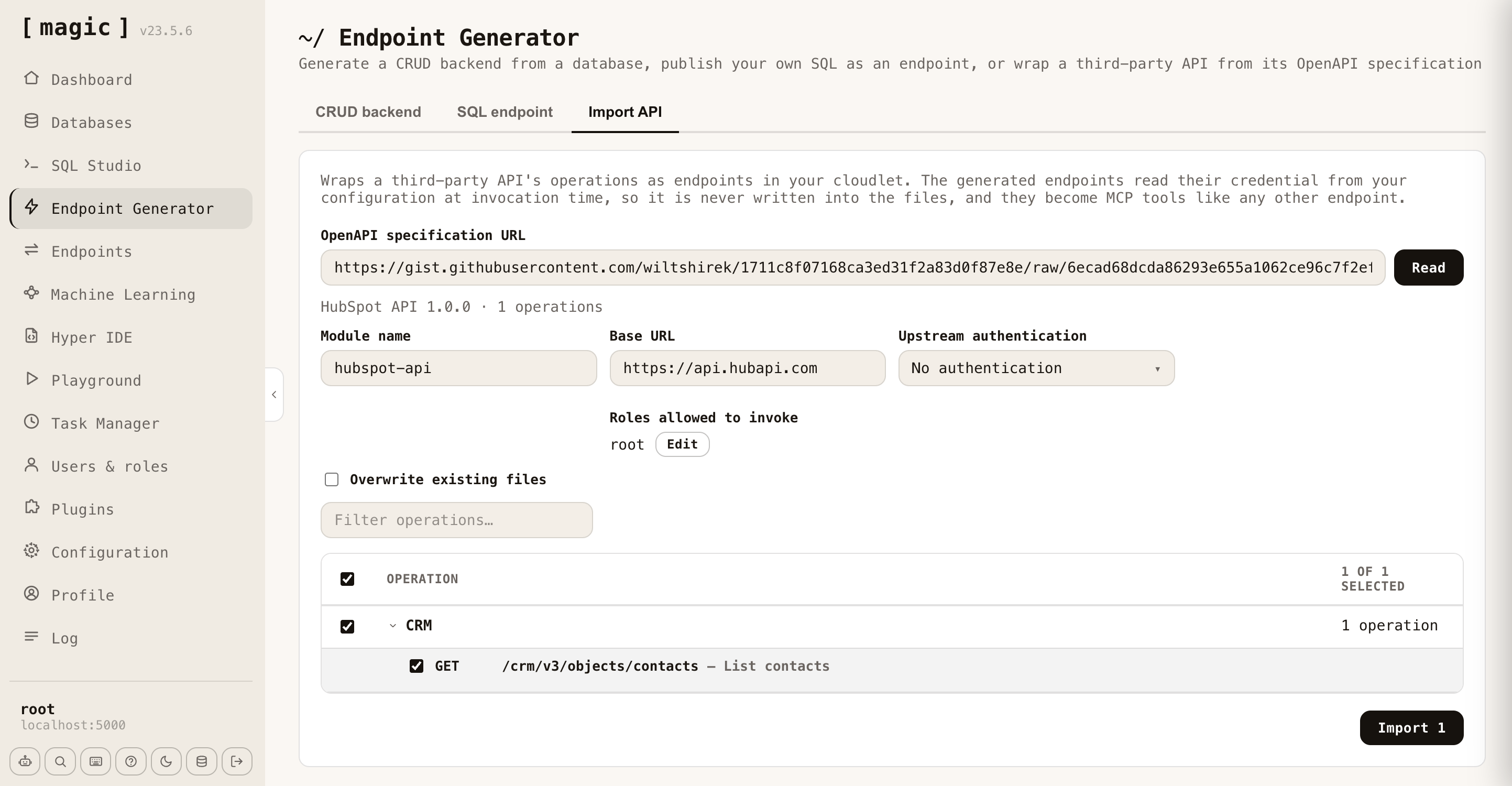
Open the Endpoint Generator, pick the Import API tab, paste the specification URL, and click Read. Magic fetches and parses it and reports what it found — here, one operation. The module name and base URL fill themselves in; you set the module (hubspot-api), confirm the base URL (https://api.hubapi.com), and choose which of your roles may invoke the result (root). Tick the operation and click Import.
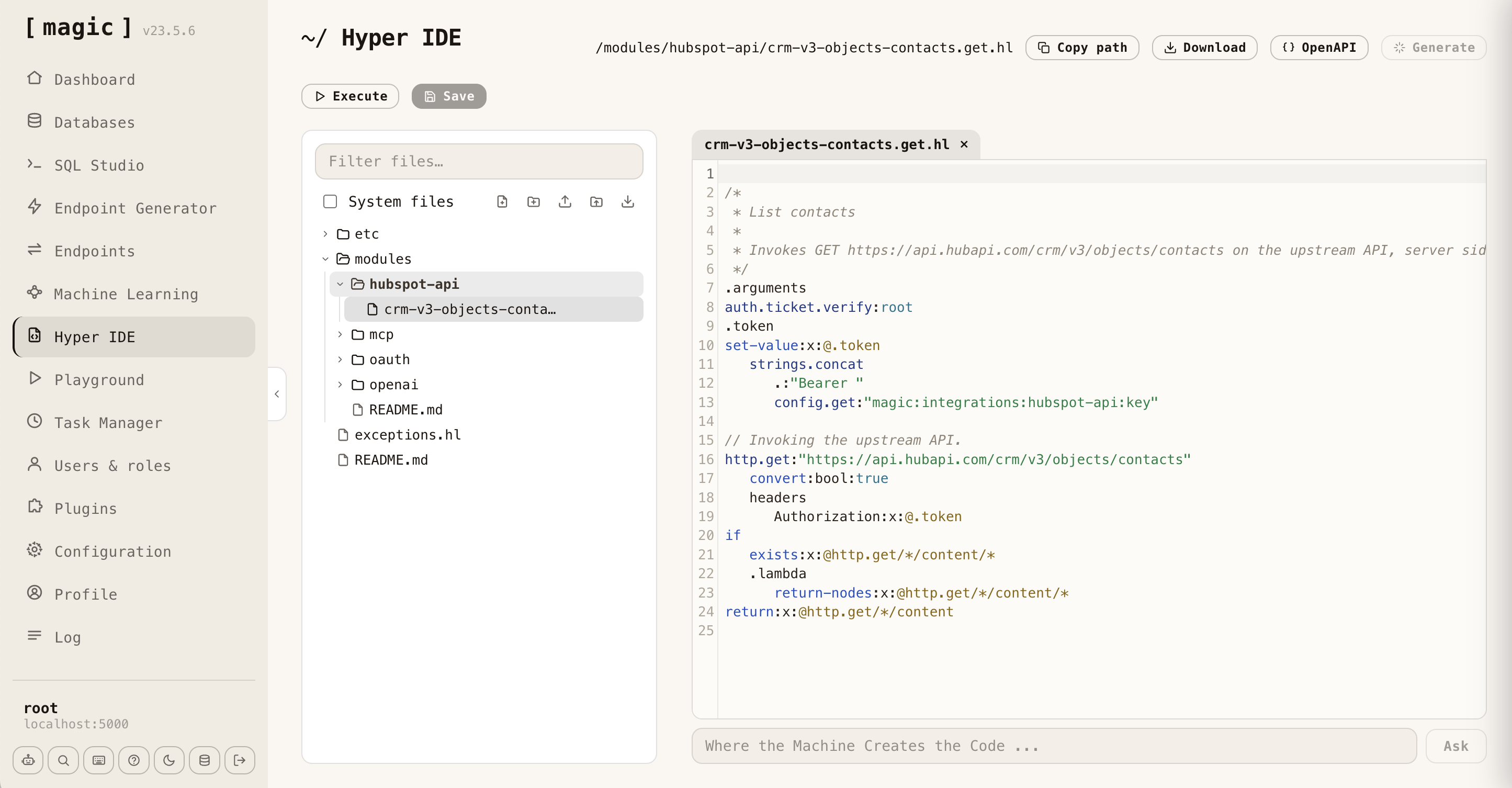
What comes out is a Hyperlambda file in your own cloudlet — not a proxy, a file you can read. The credential is the part worth noticing: your HubSpot token is never written into it. The wrapper reads it from configuration at the moment it is invoked, and attaches it as a bearer header on the way upstream.
// List contacts
// Invokes GET https://api.hubapi.com/crm/v3/objects/contacts on the upstream API, server side.
.arguments
auth.ticket.verify:root
.token
set-value:x:@.token
   strings.concat
      .:"Bearer "
      config.get:"magic:integrations:hubspot-api:key"
http.get:"https://api.hubapi.com/crm/v3/objects/contacts"
   convert:bool:true
   headers
      Authorization:x:@.token
Two lines are doing the security work. auth.ticket.verify:root puts the role check inside the artifact, so whoever calls this — a browser, or Claude — hits the same gate. And config.get means the token lives in your configuration, never in the file, which is why the file is safe to commit and an agent cannot leak a secret it was never handed.
Step 2 — It is already an MCP tool
This is the step that is not a step. There is no export. Magic publishes every endpoint in your cloudlet over MCP, and it builds that catalogue by enumerating the endpoints that exist, right then — so the List Contacts wrapper is a callable tool the instant the file lands, with the types and descriptions the specification declared. Nobody wrote a tool definition. I covered why the catalogue cannot drift out of date in From Prompt to MCP Tool in 5 Seconds.
Verify it works before Claude ever sees it — invoke it from the Endpoints screen. Two hundred, in well under a second, with a live contact record straight from HubSpot: id, name, email, created and modified dates.
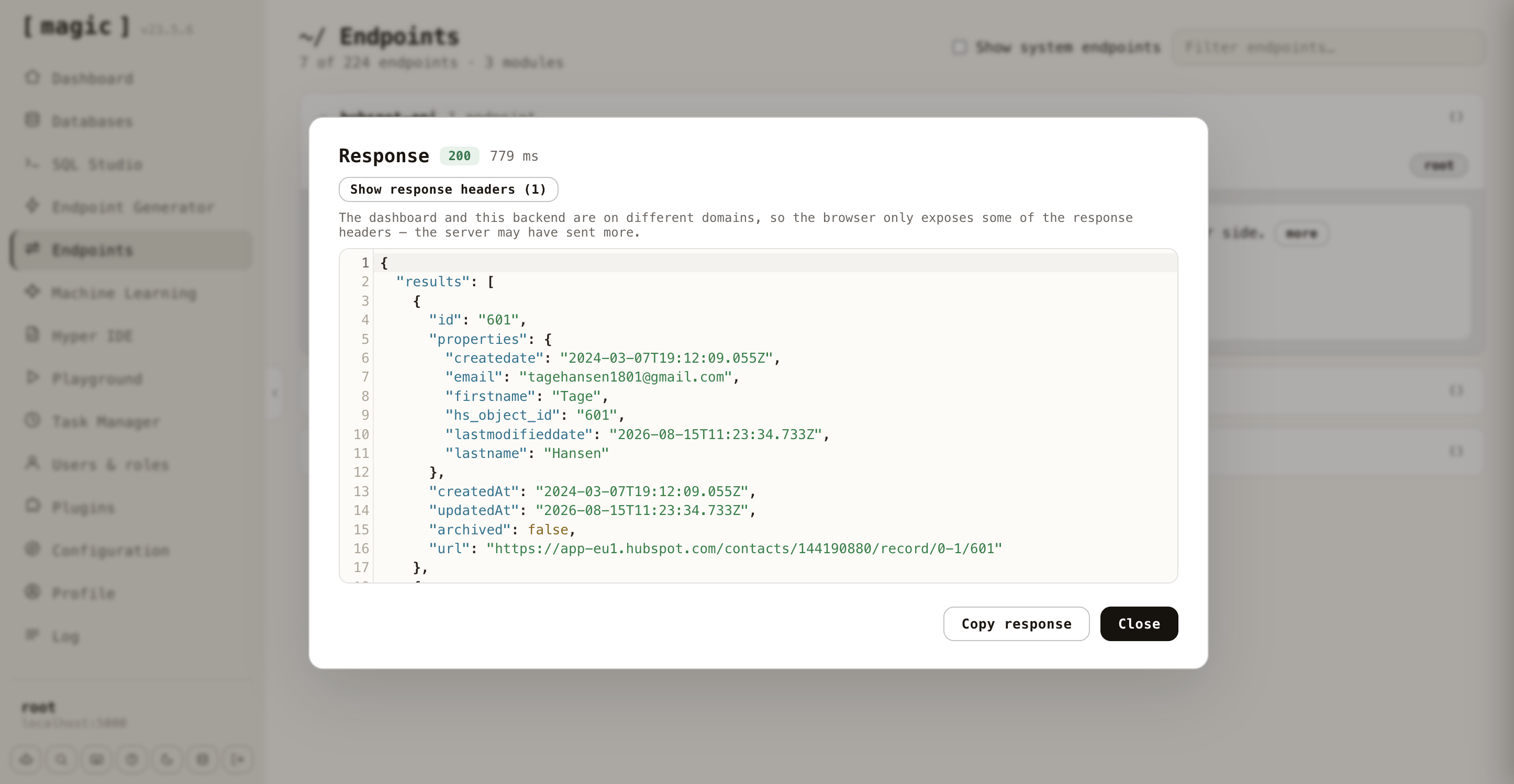
A backend endpoint, wrapping a real CRM, returning real data — and no hand-written integration code anywhere in it.
The two clicks, on video
Here is the whole thing end to end, including the Claude side, in a couple of minutes. The written walkthrough of the connection continues below.
Step 3 — Connect Claude
You need one thing: your cloudlet's MCP URL. And you can narrow it to just the CRM, so Claude sees the contacts tool and nothing else, by appending a path:
https://your-cloudlet/magic/modules/mcp/mcp?path=/modules/hubspot-api/
In Claude, go to Customize → Connectors, click the +, choose Add custom connector, paste that URL, and click Add. Claude then walks you through Authorise. That is the pair that matters: Add, then Authorise. The connected cloudlet shows up with its tools and per-tool permissions, exactly like any other connector.
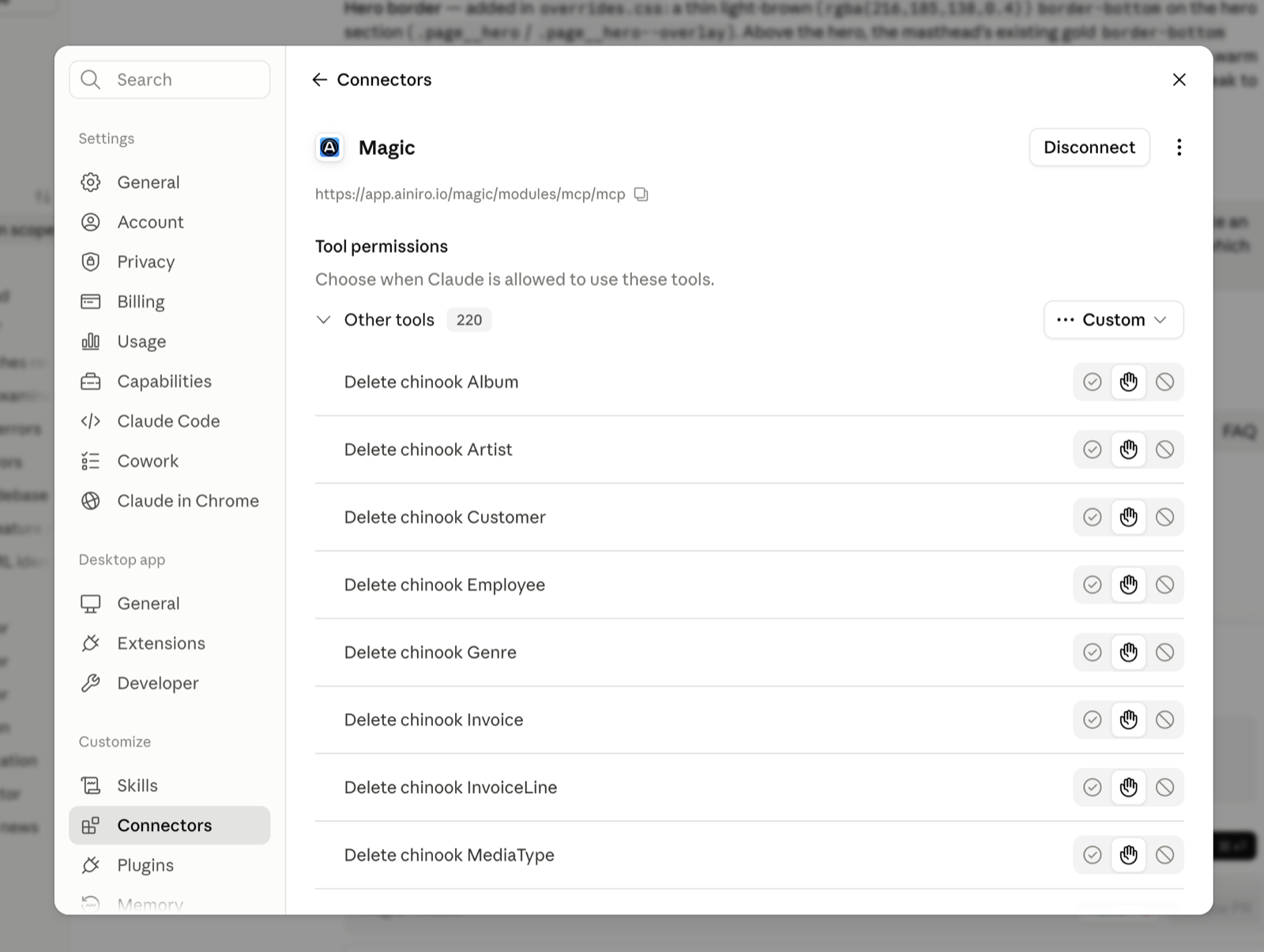
Honesty about the number, because the round ones are always slightly rounded: yes, you also open a menu and paste a URL. But there is no OAuth application to create beforehand, no client ID to generate, no secret to copy across — the two clicks that carry the weight are Add and Authorise, and the reason there is nothing between them is the next section.
Step 4 — Why there is no client ID to paste
When Claude first reaches the MCP URL without a token, the cloudlet does not just refuse. It answers with a 401 that points at its own OAuth metadata:
HTTP/2 401
www-authenticate: Bearer resource_metadata="https://your-cloudlet/.well-known/oauth-protected-resource"
Claude follows that pointer to the cloudlet's authorisation-server metadata, and finds everything it needs to connect itself:
{
  "issuer": "https://your-cloudlet",
  "authorization_endpoint": ".../magic/modules/oauth/authorize",
  "token_endpoint": ".../magic/modules/oauth/token",
  "registration_endpoint": ".../magic/modules/oauth/register",
  "code_challenge_methods_supported": ["S256"],
  "scopes_supported": ["mcp"]
}
That registration_endpoint is dynamic client registration: Claude registers itself as an OAuth client, on the fly, and runs the authorisation-code flow with PKCE. There is no application for you to set up in advance, which is precisely why the Advanced settings box for a client ID and secret stays empty. The cloudlet describes its own front door, and Claude walks through it.
Step 5 — Ask Claude about your CRM
Now the point of all of it. Ask Claude to list your HubSpot contacts, and it calls the tool — which runs the endpoint, through the same invocation path an HTTP request takes, carrying your identity. The role check that guards the wrapper from a browser is the role check that guards it from Claude, because it is the same check. There was never a second one to keep in sync.
Two identity gates sit on this, and they were built by two different teams that have never met. Claude inherits your permissions: if you cannot see a record in the source, the connector cannot reach it. And Magic assembles the tool catalogue per caller from the roles on the authenticated ticket, then runs the identical role check again when the tool is actually invoked. Neither side trusts the other to do it. That is the opposite of shipping an agent a shared service token and hoping, and it is the whole argument of Agentic AI Without Permission Boundaries Is Just Malware With UX.
Which makes the one dial that matters easy to name: the role you connect Claude with is its blast radius. Connect a scoped service role that sees the CRM, not root. Give the sales agent the tool belt that reaches contacts, and nothing that reaches your payments configuration.
The honest edges
Anthropic's cloud reaches your cloudlet, not your laptop. Custom connectors are called from Anthropic's infrastructure, so the cloudlet must be reachable over the public internet. A localhost build is perfect for developing the wrapper — but to connect Claude you host the cloudlet, or allowlist Anthropic's egress for an outbound-only path, or tunnel it. This is the one real tension with the self-hosted, inside-the-firewall story I make for internal APIs; for a fully air-gapped backend, the agent lives inside the boundary too, over the API rather than the consumer app.
Claude caches the tool list when it connects. Import a new operation and the catalogue is current on the server instantly — but your connector will not show it until you reconnect. This trips people up regularly, and it is a client behaviour, not a server one.
Import what you want, not everything. HubSpot's full specification runs to hundreds of operations. Handing a model several hundred tools makes it worse at choosing, not better. Import the handful you actually want done; the rest will be there tomorrow.
Plan mechanics. Custom connectors are in beta. Free plans get one custom connector; on Team and Enterprise an Owner enables the connector for the organisation first, and each person still authenticates as themselves.
Try it
One command:
curl -fsSL https://hyperlambda.dev/docker-compose.yaml | docker compose -f - up
Open localhost:5555, point it at localhost:4444, log in with root / root, and go to the Endpoint Generator's Import API tab. Paste a HubSpot specification, pick the operation you want, and import it. Then host the cloudlet — or tunnel it — and add its MCP URL to Claude as a custom connector.
Magic is MIT-licensed and open source — the repository is at github.com/polterguy/magic, with documentation at docs.ainiro.io. If you would rather not host it, a managed cloudlet is reachable from Claude out of the box.
Your CRM already describes itself in an OpenAPI file, and Claude already knows how to connect to anything that describes its own front door. The two clicks are just the moment those two facts meet.
Frequently asked questions
How do I connect HubSpot to Claude?
Import HubSpot's OpenAPI specification into Magic's Endpoint Generator, which turns each operation into a secured endpoint that is automatically an MCP tool. Then add your cloudlet's MCP URL to Claude as a custom connector under Customize, Connectors, and click Add, then Authorise.
Do I need to create an OAuth client ID to connect Claude to Magic?
No. The cloudlet answers an unauthenticated request with a 401 pointing at its own OAuth metadata, and its registration endpoint supports dynamic client registration, so Claude registers itself and runs the authorisation-code flow with PKCE. The client ID and secret fields stay empty.
Is my HubSpot token exposed to Claude?
No. The token is never written into the generated file. The wrapper reads it from configuration at the moment it is invoked and attaches it as a bearer header on the way upstream, so an agent cannot leak a secret it was never handed.
Does the Magic cloudlet need to be publicly reachable to connect to Claude?
Yes for Claude's custom connectors, because they are called from Anthropic's infrastructure. A localhost build is fine for developing the wrapper, but to connect Claude you host the cloudlet, allowlist Anthropic's egress, or tunnel it.
Related reading
- MCP Server — the overview
- Database AI Agents — the same two clicks over your SQL database
- Convert your OpenAPI Specification to a Secured MCP Tool in Seconds
- From Swagger URL to Instant API
- An API Magic Wand for your AI Agent
- Magic Now Supports MCP Server Integration for AI Agents
- Agentic AI Without Permission Boundaries Is Just Malware With UX
- Build AI Agents That Can Create Their Own Backend Tools